A gap analysis template is supposed to be simple: current state → desired state → what’s missing → what you’ll do next. In real life, it turns into a messy spreadsheet, five versions of “the truth,” and a meeting where everyone debates the labels instead of closing the gap.
Here’s the shift: when you build your gap analysis inside an AI Workspace and AI Whiteboard, the matrix stops being a static table and starts behaving like a living decision board. You can pull evidence in (docs, screenshots, CSVs), generate a matrix in seconds, and then expand the gaps into concrete actions with a couple of clicks. That’s the whole point. And yes—150,000+ users already run their frameworks this way in Jeda.ai.
What is gap analysis?
Gap analysis is the process of measuring the difference between where you are now and where you need to be, then translating that difference into an action plan. Most definitions agree on the core idea: compare the current state to the desired state, identify what’s missing, and decide what changes close the distance.
One useful way to think about it: gap analysis is a decision filter. It forces you to say, clearly, “This is our target,” then it exposes the uncomfortable part—what you don’t have yet. And that “don’t have yet” can be capability, process, tooling, skills, documentation, budget, or time.
A quick truth: gap analysis isn’t credited to a single inventor the way Porter’s Five Forces is. It’s a practical method that shows up across strategy, project management, and quality systems. In quality management, for example, “gap analysis” commonly means comparing your current system to a defined standard (like ISO requirements) to find shortfalls.
What makes a gap analysis “good”?
A good gap analysis is:
- Specific (not “improve marketing,” but “increase trial-to-paid conversion from 3.2% to 5.0%”)
- Evidence-backed (not vibes—screenshots, funnel data, customer calls, SOPs)
- Owned (every gap has an owner, a due date, and a next action)
- Visible (the team can see the reasoning and agree on the trade-offs)
That’s why doing it on a Visual AI board beats doing it in a spreadsheet.
Why use a gap analysis template with AI?
Because time is expensive—and confusion is more expensive.
AI doesn’t “do strategy for you.” What it does well is the annoying part: collecting, structuring, and expanding information so your team can focus on decisions. In Jeda.ai, you can generate a gap analysis as a Matrix, refine it collaboratively, then keep extending it until it becomes a workable plan.
- Stop rebuilding the same template
Generate a clean gap analysis matrix fast, then reuse it as a team template for every roadmap, audit, or transformation initiative.
- Evidence-in, not opinion-first
Bring docs, PDFs, screenshots, and CSV/Excel data. Your analysis stays tied to real inputs instead of memory wars.
- Align decisions in one board
A gap analysis is only useful if the team agrees. Build it inside an AI Whiteboard where collaboration is the default.
- Generate options, not just a list
Use the Multi‑LLM Agent to explore multiple ways to close a gap, then let the Aggregator pick the best direction to start from.
- Editable visuals-out
Unlike text-only tools, Jeda.ai outputs stay editable—cells, shapes, arrows, and notes are all yours to tweak.
- Export what stakeholders need
Export boards as PNG, SVG, or PDF for decks, docs, and approval cycles—without reformatting the whole thing.
The gap analysis matrix
A practical gap analysis template usually works best as a grid with these fields:
- Area (Process, People, Tech, Data, Policy, Product, etc.)
- Current state (facts, not wishes)
- Target state (a measurable goal or standard)
- Gap (what’s missing, broken, or inconsistent)
- Action (what you’ll do next)
- Owner + due date (so it actually happens)
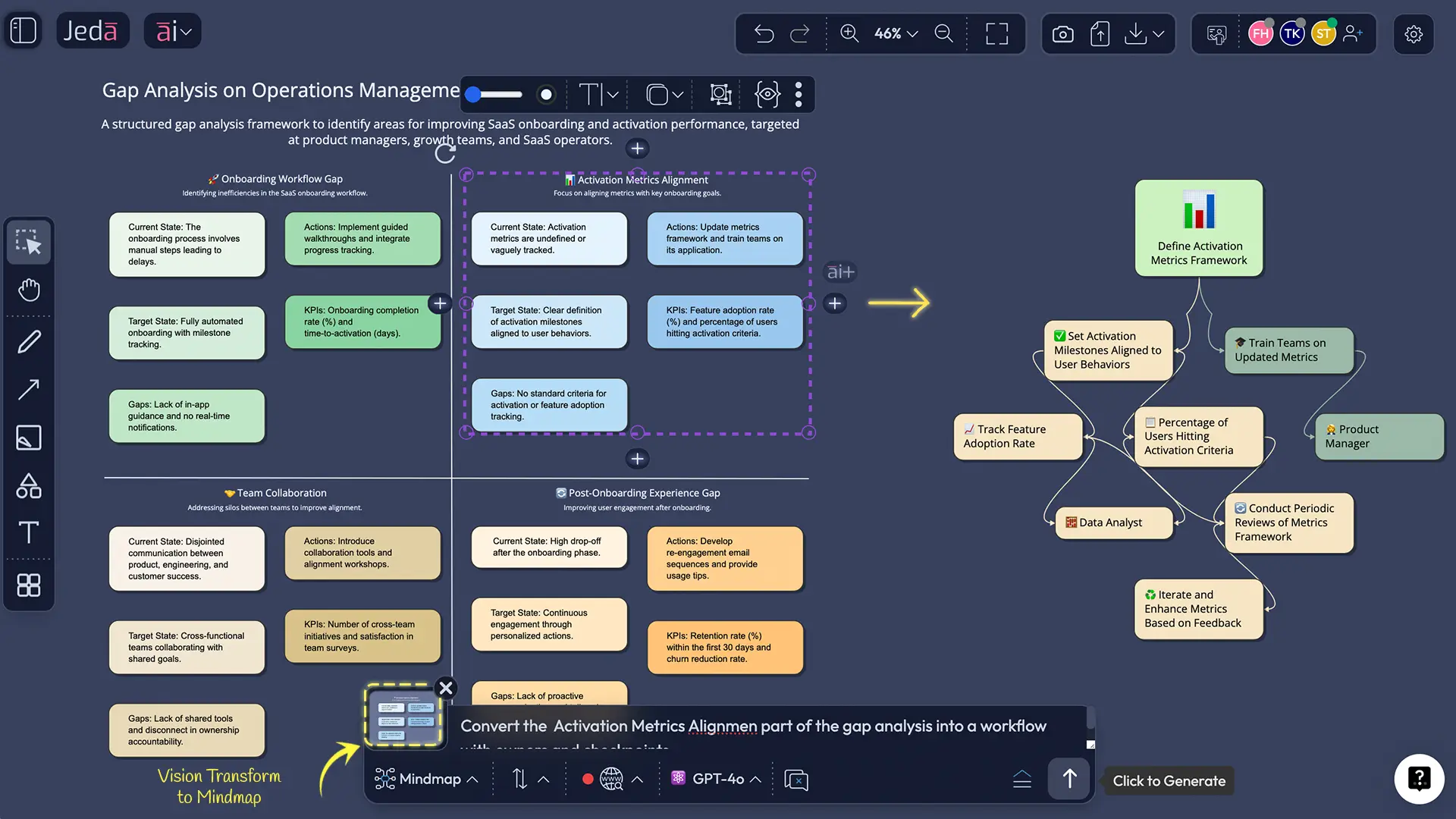
In Jeda.ai, the Matrix command makes this structure easy to generate and easy to edit. And if you want to go deeper, you can convert the same board into a Flowchart or Diagram using Vision Transform—handy when the “action” becomes a workflow.
How to create a gap analysis template in Jeda.ai
This section includes two methods:
- Method 1: Recipe Matrix (AI Menu template)
- Method 2: Prompt Bar (Matrix command)
And then we’ll add the AI+ deep dive to expand any gap into a mini plan.
Method 1: Recipe Matrix (recommended)
Use the AI Menu when you want a structured template fast and you don’t want to think about formatting.
- Open the AI Menu
In your Jeda.ai AI Workspace, click the AI Menu (top-left) to browse the recipe library.
- Choose Matrix Recipes
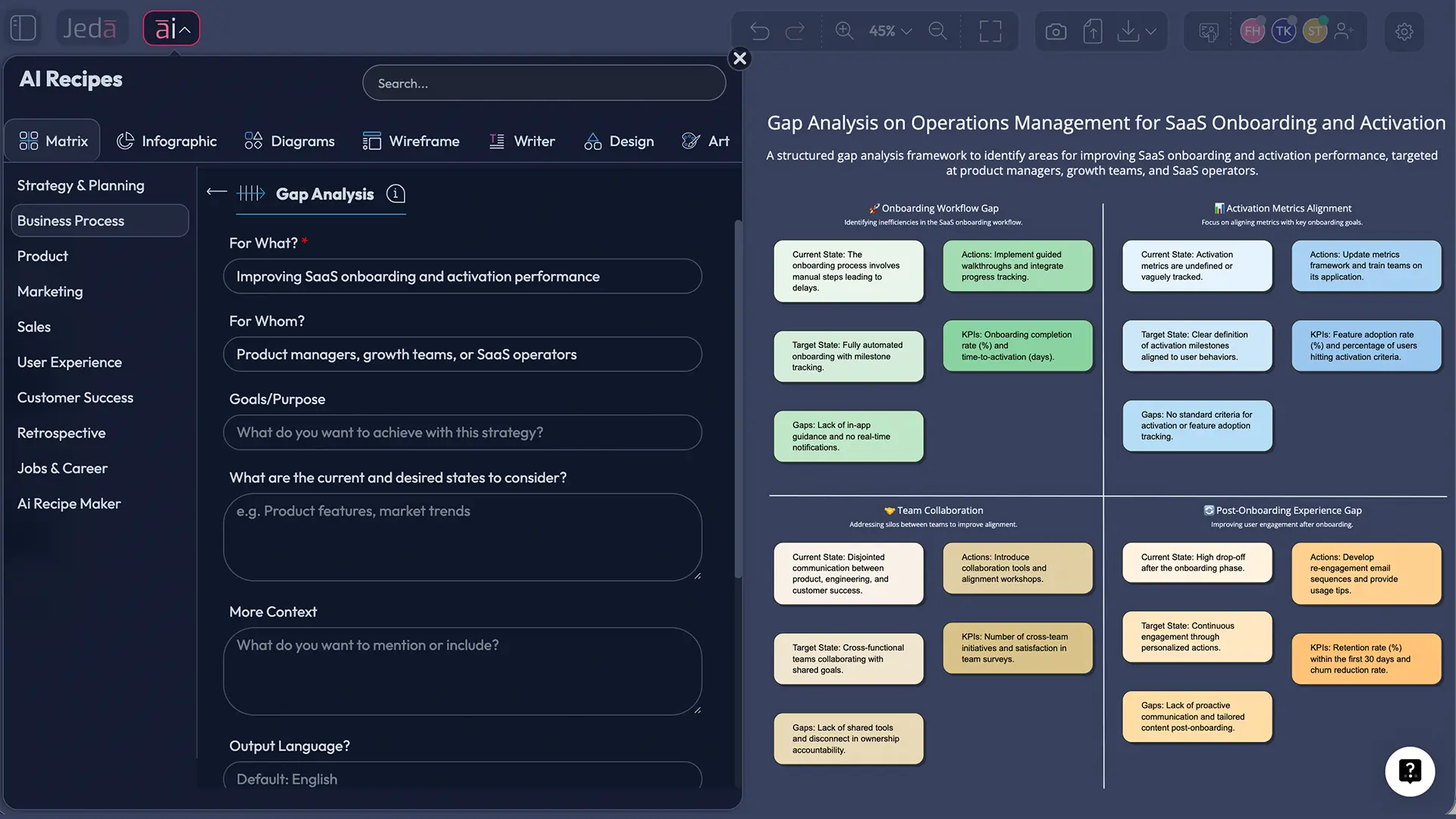
Select the Matrix Recipes category and pick the Gap Analysis template/recipe.
- Add your context
Describe what you’re analyzing (team, product, process, department) and define the desired outcome or standard you’re aiming for.
- Select models (optional)
Run 1–3 models with the Multi‑LLM Agent if you want alternative perspectives, then use the Aggregator Model to choose the best draft.
- Generate the matrix
Click Generate to create your gap analysis template as an editable matrix on the AI Whiteboard.
- Tighten it with edits
Rewrite vague cells into measurable statements, add owners and due dates, then color-code priorities (High / Medium / Low).
Method 2: Prompt Bar (Matrix command)
Use the Prompt Bar when you want full control over the structure.
- Open the Prompt Bar at the bottom of the canvas.
- Select the Matrix command.
- Describe the scope (what you’re comparing), the target state, and the dimensions you want in the matrix.
- Press Enter to generate.
AI+ deep dive (expand one gap without rewriting everything)
Once your matrix exists, you’ll usually spot one cell that’s “the real problem.” Maybe it’s missing data, unclear ownership, or a process bottleneck.
To go deeper:
- Select the specific sticky note / cell you want to expand.
- Tap the AI+ button to extend it with AI.
- Review the expanded output and keep what’s useful (delete the fluff—AI sometimes gets chatty).
Important boundary: AI+ is for extending what’s already on the board. Keep it focused on expansion, alternatives, and next steps—don’t treat it like a magic button for facts you haven’t provided.
Gap analysis template examples
Let’s make this real. Below are three examples you can copy as patterns.
Example 1: SaaS onboarding conversion gap
Current state: Trial users drop after the first session.
Target state: More users reach the “Aha” moment inside 24 hours.
Matrix rows you’d include:
- Product walkthrough: current = generic, target = role-based
- Email lifecycle: current = one-size-fits-all, target = triggered sequences
- In-app guidance: current = none, target = contextual tooltips for Aha actions
- Support: current = reactive, target = proactive concierge for high-intent accounts
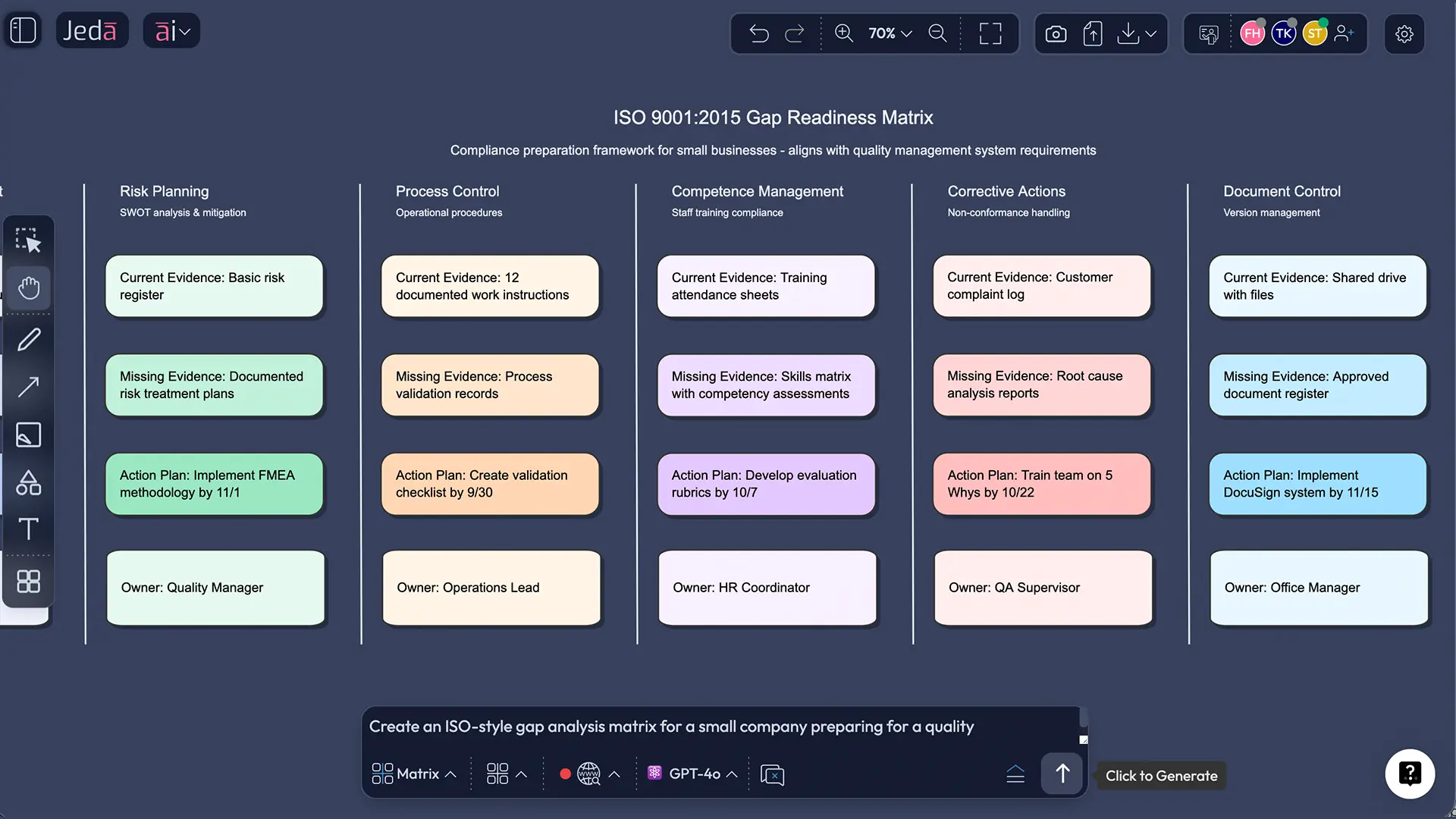
Example 2: ISO-style compliance gap (quality management)
In compliance work, gap analysis often means “compare what we do today” vs “what a standard requires,” then list what’s missing and what needs to be documented or improved.
Good matrix dimensions here:
- Requirement area (document control, risk management, corrective actions)
- Current evidence (existing SOPs, audit logs, training records)
- Missing evidence (what’s not documented or not followed consistently)
- Action plan (create/update SOP, train, implement controls, internal audit schedule)
This is where an AI Workspace helps: you can attach the relevant docs and keep the “evidence trail” beside the matrix, instead of in five folders.
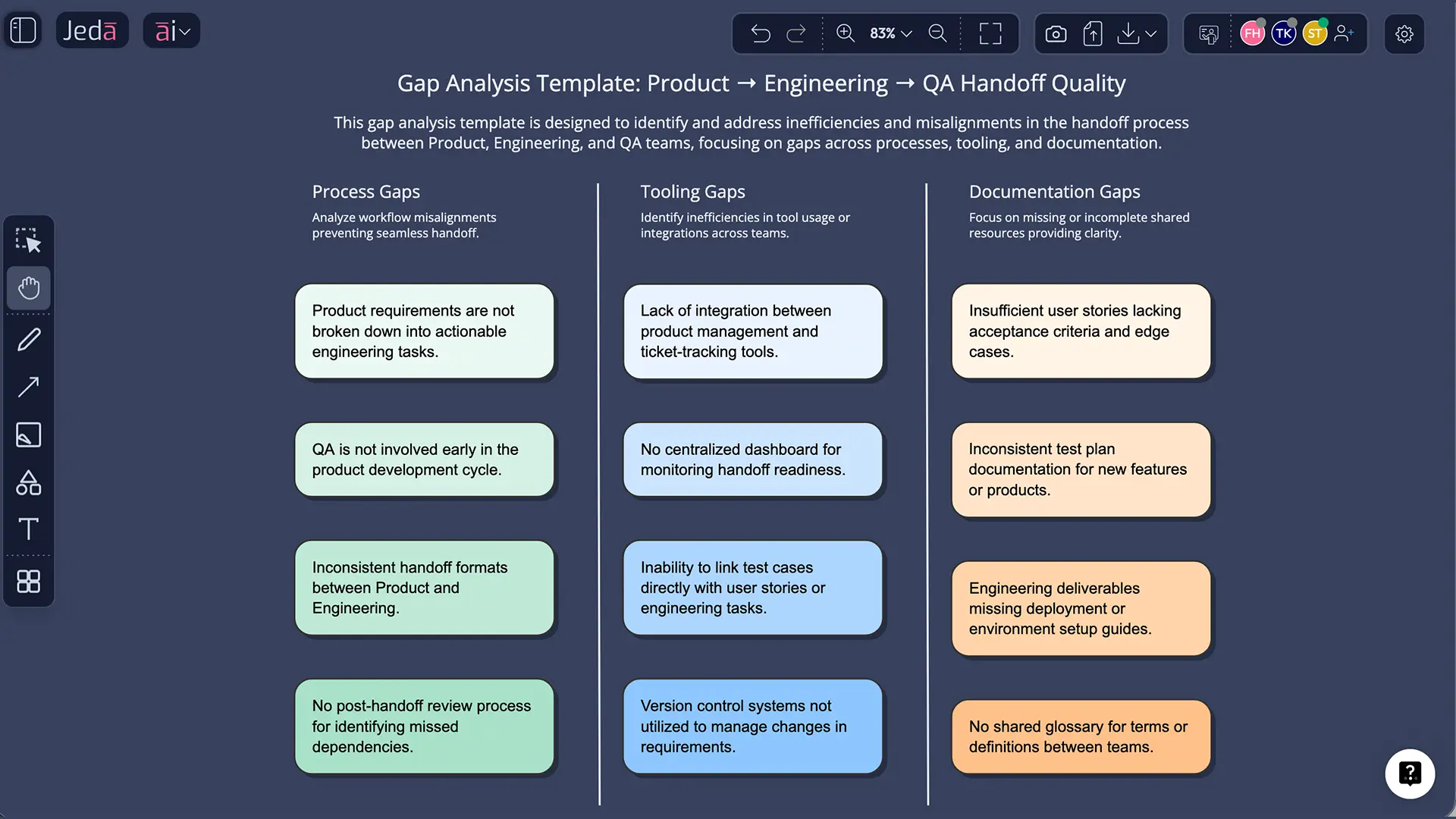
Example 3: Engineering handoff gap (product → dev → QA)
This one shows up everywhere.
- Current state: Tickets are missing acceptance criteria, QA finds “unknown unknowns”
- Target state: Every ticket has testable criteria + edge cases + owner
The gap analysis matrix can include:
- Ticket template quality
- Definition of done
- QA test coverage
- Release notes consistency
- Post-release monitoring
And once the matrix is stable, Vision Transform can turn the “handoff action plan” into a workflow flowchart.
Best practices that make gap analysis actually work
Common mistakes to avoid
- Confusing activities with outcomes. “Run a workshop” isn’t a target state. “Approve a roadmap with prioritized bets” is.
- Keeping the current state too polite. If the truth is “we don’t have a process,” write that.
- Listing gaps without actions. A gap without an action is just a complaint in table form.
- No ownership. If “everyone owns it,” nobody owns it.
- Treating the matrix as a one-time doc. Gap analysis is most useful as a recurring decision artifact.
Gap Analysis vs similar frameworks
Sometimes you don’t need a gap analysis—you need a different lens.
Internal links you can add on your site:
- Jeda.ai AI Workspace:
/ai-workspace - Jeda.ai AI Whiteboard:
/ai-whiteboard - Related frameworks: Gap analysis pairs well with SWOT, Fishbone, and Value Chain pages in your framework library (Jeda.ai supports 300+ strategic frameworks).
Frequently Asked Questions
- What is a gap analysis template?
- A gap analysis template is a structured format—usually a matrix—that compares your current state to your target state, identifies what’s missing, and maps each gap to actions, owners, and timelines. The goal is to turn ‘we should improve’ into a measurable plan your team can execute.
- What are the steps in gap analysis?
- Most gap analyses follow a simple flow: define scope and target state, document the current state using evidence, identify the gaps, prioritize them by impact and effort, and create an action plan with owners and due dates. Done well, it becomes a recurring decision artifact—not a one-off document.
- How do I write a good target state?
- A good target state is measurable and time-bound. Instead of ‘better onboarding,’ define a metric (activation rate, cycle time, defect rate), a target number, and a date. If you’re working against a standard (like ISO requirements), the target state is the requirement plus the evidence you’ll maintain.
- When should I use gap analysis vs SWOT?
- Use gap analysis when you already know the target outcome and need a plan to close the distance. Use SWOT when you’re still trying to understand the landscape—strengths, weaknesses, opportunities, and threats—before deciding what the target should be. Many teams do SWOT first, then run a gap analysis to execute.
- Can AI create a gap analysis for me?
- AI can generate a strong first draft by structuring your inputs into a matrix, proposing likely gaps, and suggesting actions. But you still have to supply context and validate facts. The win is speed: you start with a usable template in minutes, then refine it with your team on the board.
- What should I include in the current state?
- Include facts and evidence: metrics, screenshots, customer quotes, process docs, audit logs, and examples of real work. If you can’t point to evidence, mark the cell as ‘unknown’—that’s a gap too. AI is helpful here because it can summarize documents and extract patterns quickly.
- How long does a gap analysis take?
- A basic gap analysis for one process can take 30–90 minutes if you already have the evidence handy. Bigger organizational or compliance gaps can take days. AI tends to compress the setup time (structuring and drafting), but alignment and ownership still take real conversation.
- What’s the difference between gap analysis and an audit?
- A gap analysis compares your current state to a target or standard to find what’s missing. An audit looks for evidence that your documented process is actually followed. In quality systems, gap analysis often comes first to identify missing elements, and audits follow to verify implementation.
- Is gap analysis only for business strategy?
- No. Teams use gap analysis for product execution, process improvement, training and skills planning, IT modernization, compliance readiness, and even personal development. If you can define a target and measure your current state, gap analysis is a useful structure.
- What can I export from Jeda.ai?
- You can export your finished gap analysis board as PNG, SVG, or PDF. That covers most stakeholder needs: slides, documentation, sharing, and approvals. If you want other formats, export visually and embed it where your team already works.
Sources & further reading
- [1]
Investopedia Staff (2025) . “Gap Analysis: Definition, Examples, and How It Works” Investopedia.
View Source ↗ - [2]
Harvard Business School Online (2024) . “How Gap Analysis Can Drive Strategic Change in Your Organization” HBS Online Blog.
View Source ↗ - [3]
Smartsheet (2018) . “Guide to Gap Analysis with Examples” Smartsheet.
View Source ↗ - [4]
American Society for Quality (ASQ) (2013) . “Gap Analysis vs. Pre-assessment for a Standards Audit” ASQ Ask the Experts.
View Source ↗ - [5]
TechTarget (2021) . “What is gap analysis and how does it work?” TechTarget.
View Source ↗
Build Your Gap Analysis Template in Jeda.ai
Join over 150,000+ users who use Jeda.ai’s AI Workspace and AI Whiteboard to turn messy planning into decision-ready visuals.
Try Free Template