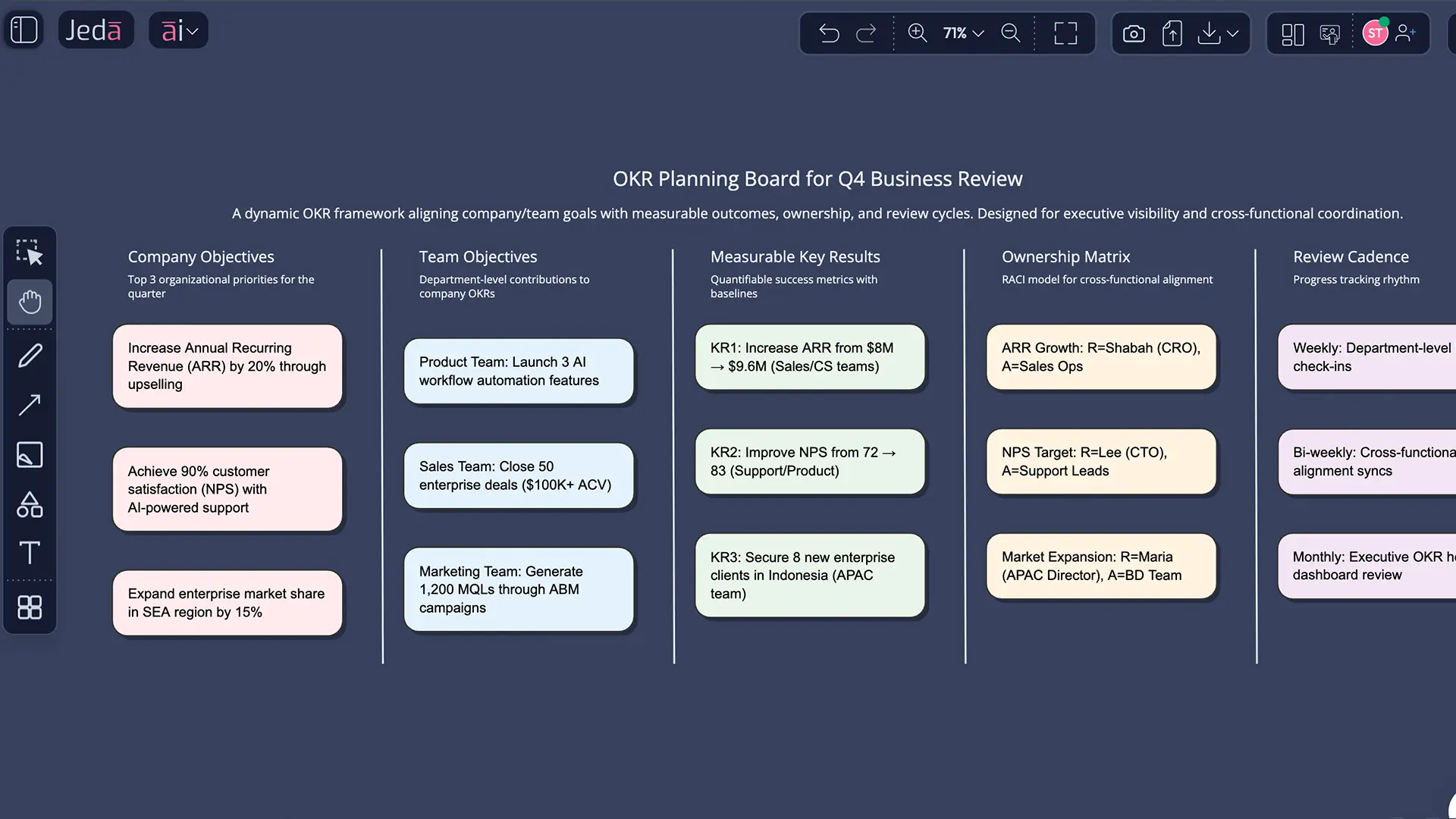
OKR Planning with AI gets a lot more interesting when you stop treating OKRs like polite corporate wallpaper and start using them as a live operating system. That is the real win. Inside Jeda.ai, you can move from vague quarterly ambition to a shared, editable board that shows objectives, measurable key results, owners, dependencies, and review rhythm in one place. In other words, strategy stops hiding in slides and starts living in your AI Workspace and AI Whiteboard.
For most teams, the pain is not goal-setting in theory. It is translation. Leadership says one thing, managers hear another, teams build a third, and by week three the “plan” is already a museum piece. Jeda.ai is built for that messy middle. With 300+ strategic frameworks, a Visual AI canvas, and a collaborative structure used by 150,000+ users, it gives you a faster way to draft, pressure-test, and refine OKR planning without falling back into spreadsheet fog.
If you already work in an AI Workspace or run planning sessions on an AI Whiteboard, this is where Jeda.ai feels especially useful: you can generate the first version fast, then keep editing it as reality changes.
What is OKR planning?
OKR planning is the process of turning a strategic direction into a small set of ambitious objectives and measurable key results that teams can review, score, and adjust over a defined cycle. The method grew out of Intel in the 1970s, where Andy Grove shaped the approach, and John Doerr later brought it to Google. Google still uses annual and quarterly OKRs, with regular company-wide sharing and grading cycles.
At its best, OKR planning creates focus, alignment, transparency, and discipline. At its worst, it becomes a dressed-up task list. Google re:Work is blunt about this: OKRs are not a shared to-do list. They are supposed to define the impact you want, while teams figure out the methods. Bain makes a similar point from a strategy lens, arguing that OKRs work better when they combine top-down direction with bottom-up feedback from teams closest to the work.
That distinction matters more than people admit.
Why use OKR Planning with AI?
Because OKR planning usually breaks in four places.
First, teams write objectives that sound nice but do not force a choice. Second, they confuse key results with initiatives. Third, dependencies stay invisible until the quarter is already wobbling. Fourth, nobody wants to reopen the document because it was built as a static artifact, not a working board.
AI helps because it speeds up the first draft. Jeda.ai helps because it does more than that. It turns the draft into an editable visual system.
Recent research is starting to explain why this matters in practice. A 2026 Journal of Business Research paper found that OKRs can help middle managers translate abstract strategic goals into concrete actions while improving coordination, commitment, and communication across the organization. That is exactly why an editable, shared visual layer matters: it gives teams a place to negotiate meaning, not just record it.
- See the whole planning system
Map objectives, key results, owners, review cadence, and dependencies in one matrix instead of scattering them across docs, sheets, and slide notes.
- Draft faster without losing judgment
Use Jeda.ai to generate a strong first version of your OKR board, then edit the language, thresholds, and ownership manually on the canvas.
- Make alignment visible
Your team can review the same board together, spot overlap, and challenge vague goals before the quarter begins.
- Separate outcomes from activity
A good matrix makes it obvious when a key result is really just a task wearing a tie.
- Extend planning without rebuilding
Use AI+ to deepen the existing board, then keep refining the generated structure instead of starting from scratch.
- Convert planning into execution views
Once the OKR board is solid, Vision Transform can turn it into a flowchart, mind map, or another execution-friendly format.
How to create OKR Planning with AI in Jeda.ai
Jeda.ai gives you two practical paths here. If you want structure from the start, use the recipe. If you want more freedom, use the Prompt Bar. Both land on the same idea: build the board first, then tighten the wording.
Method 1: Recipe Matrix
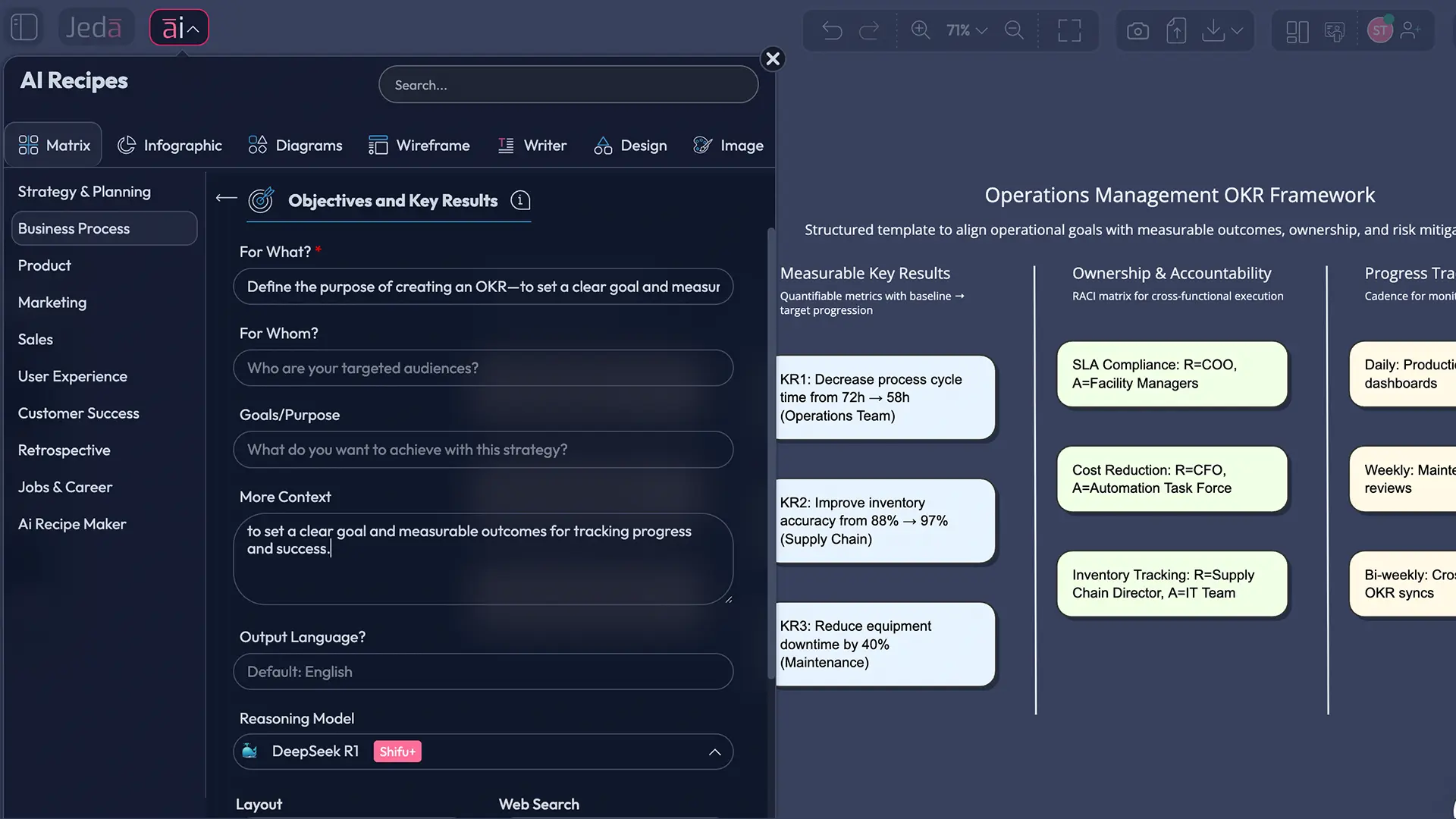
This is the cleanest route for teams that want a consistent format. Since this topic sits under the Business Process category and the recipe name is Objectives and Key Results, the AI Menu is the recommended starting point. The Matrix recipe gives you the right visual backbone immediately, and the form nudges you to clarify purpose, audience, and context before generation. Jeda.ai's workflow guide explicitly says that when a recipe exists, the AI Menu method should be included first, followed by the Prompt Bar option.
- Open the AI Menu
Click the ai∨ button in the top-left corner of Jeda.ai to open AI Recipes.
- Choose Matrix and Business Process
Select the Matrix recipe category, then open the Business Process group and choose the Objectives and Key Results recipe.
- Fill in the planning context
Add what the OKR plan is for, who it is for, the planning period, the goal or purpose, and any extra context that would sharpen the board.
- Generate the OKR matrix
Pick your reasoning model, choose the matrix layout you prefer, and generate the first version of the board.
- Review the objective language
Tighten any objective that reads like a slogan, and rewrite any key result that sounds like an activity instead of an outcome.
- Use AI+ to deepen the board
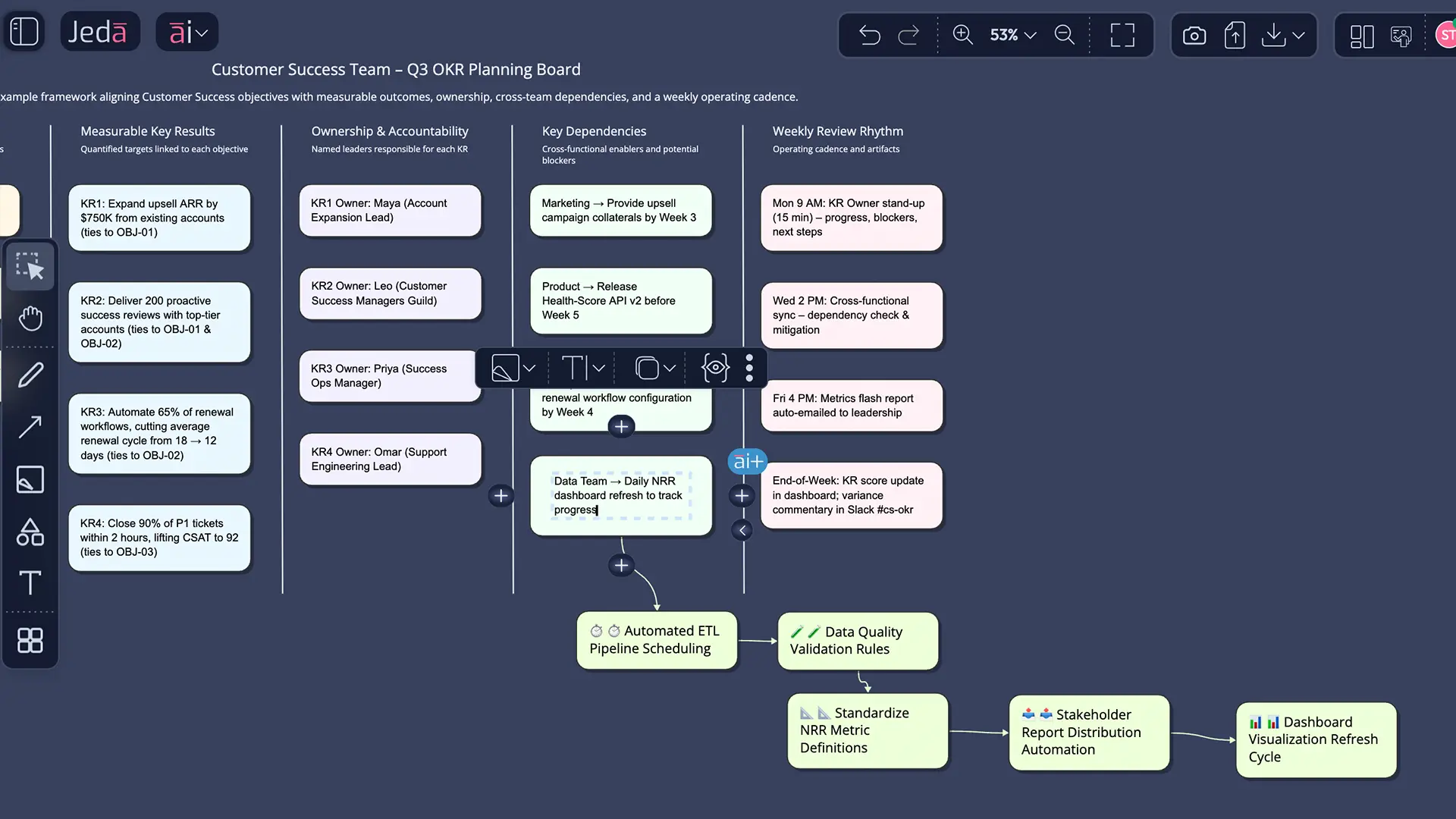
Select the generated OKR structure and use the AI+ button to extend it with more planning depth from the existing context.
- Convert the board if needed
Use Vision Transform if you want to turn the final matrix into a flowchart for operating cadence or a mind map for initiative planning.
Method 2: Prompt Bar
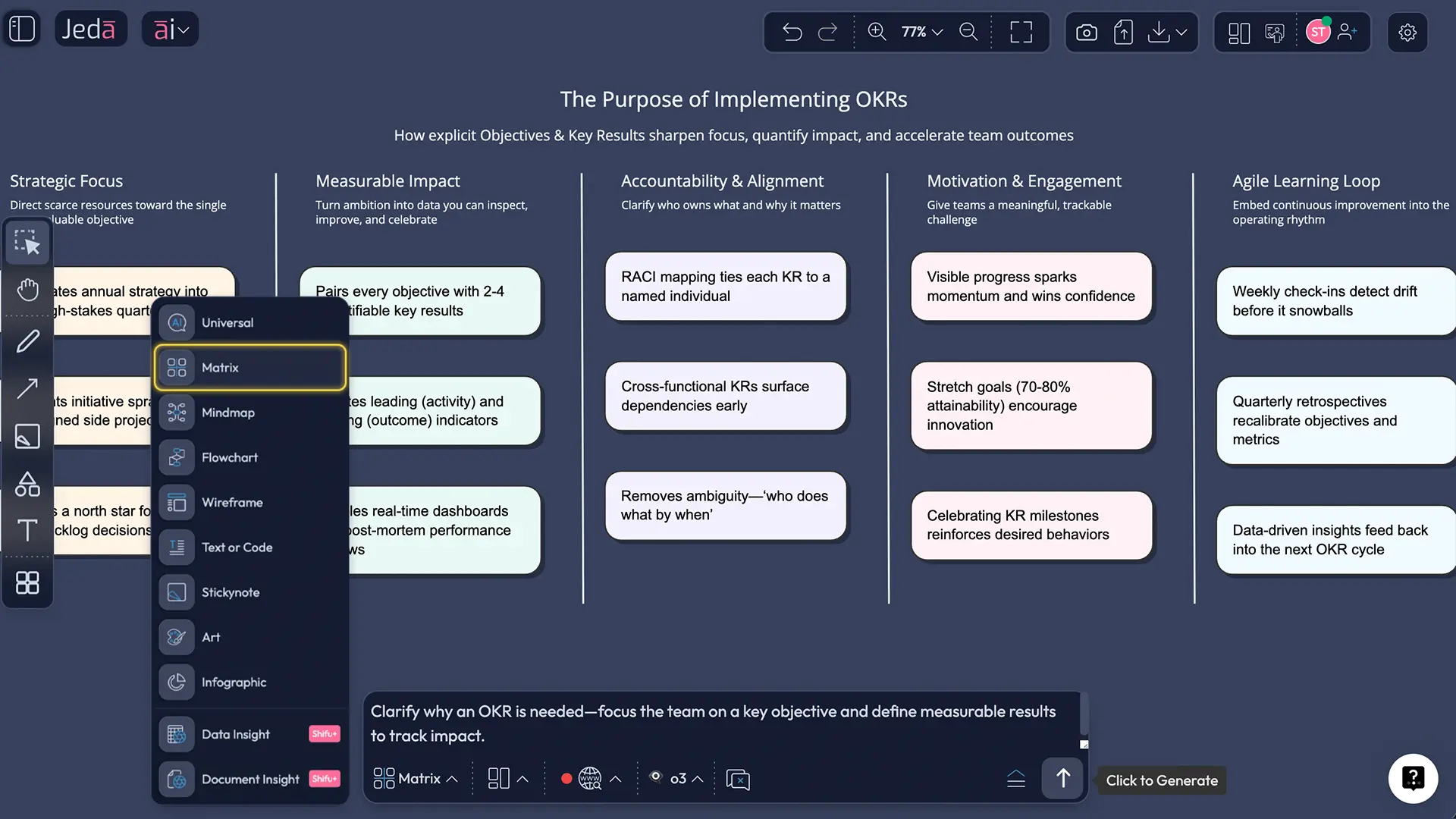
Some teams prefer a blank field and a sharper prompt. Fair enough. The Prompt Bar at the bottom of Jeda.ai is built for that. Select the Matrix command, set the layout, and describe the planning context in plain language. The platform guide confirms that the Prompt Bar is the primary input method and that Matrix is the right command for structured frameworks like this.
A practical prompt looks like this:
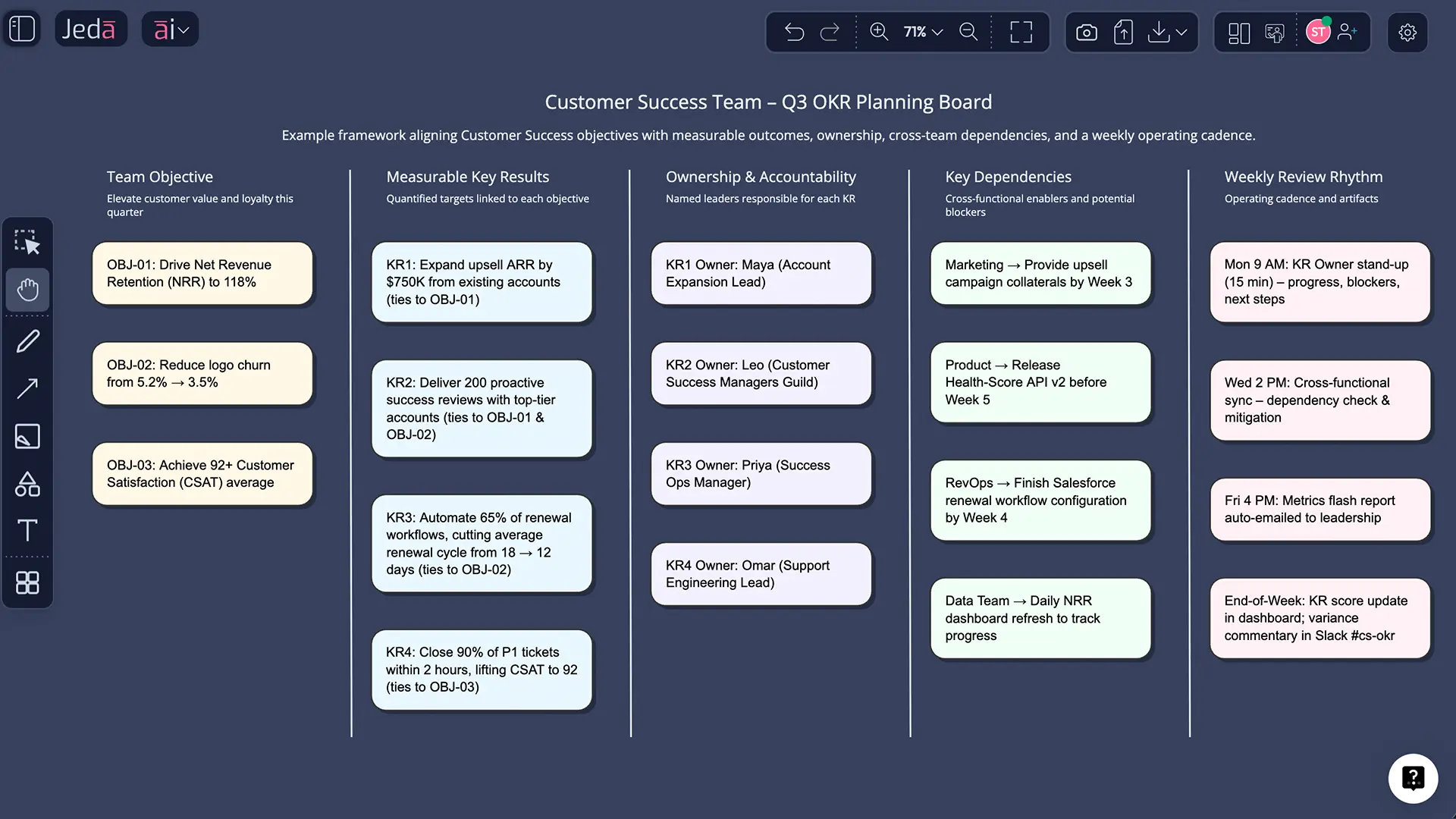
Create an OKR planning matrix for Q3 for a B2B SaaS customer success team. Include one company objective, three team objectives, 3 measurable key results per objective, owners, review cadence, major dependencies, and a note on how each team objective supports the company objective.
That prompt is specific enough to produce a useful first draft, but open enough to leave room for judgment. Good.
AI+ button generated deep dive
Once your first OKR board is on the canvas, do not throw it away and start over just because you want more detail. Select the visual and use the AI+ button to extend it. That is the better move. Jeda.ai supports AI Extend through the AI+ button on generated smart-shape visuals, and the workflow specifically wants AI+ referenced as the way to deepen an existing structure.
The trick is to use AI+ after the logic is already mostly right. Not before.
If your team needs an execution view after the planning view, select the finished matrix and use Vision Transform to convert it into a flowchart or mind map. Same thinking, different shape.
OKR Planning with AI template and example
Here is a simple pattern that works well for a quarterly planning board:
- Company Objective: Improve onboarding outcomes for new customers in Q3
- Team Objective 1: Reduce time-to-value for mid-market accounts
- Team Objective 2: Increase adoption of core workflow features
- Team Objective 3: Improve handoff quality between sales and customer success
Each team objective then gets measurable key results, named owners, review cadence, and a short dependency note. That last field is underrated. It keeps the board honest.
What makes this example work is not the wording. It is the structure. The objective is directional and qualitative. The key results are measurable. The initiatives that support them can be discussed separately, instead of being stuffed into the KR field and pretending to be strategy.
That distinction lines up with what Google and Microsoft both emphasize. Objectives should be concise and inspiring. Key results should be numeric, unambiguous, and easy to grade. Google also recommends public visibility and regular review, which is much easier to maintain on a shared whiteboard than in a buried spreadsheet tab.
Best practices for writing better objectives and key results
Good OKR planning is a writing problem before it becomes a tracking problem.
Common mistakes that turn OKRs into busywork
The first mistake is writing objectives that are really themes. “Customer obsession.” “Operational excellence.” “Innovation leadership.” Nice poster copy. Useless planning language.
The second is writing key results as activities. Launch, build, publish, host, plan. Those are actions. Sometimes they belong in initiatives. Sometimes they belong nowhere.
The third is overloading the board. Microsoft recommends keeping objectives concise and focused, and Google warns that too many priorities dilute the point of the system. If everything is a priority, congratulations, you have invented confusion.
The fourth is treating OKRs as performance reviews. Google explicitly warns against that. OKRs can inform reflection, but if people think every ambitious miss will punish them, they will sand down goals until nothing meaningful remains.
The fifth is setting the quarter and disappearing. Strong OKR planning is not one meeting. It is a cadence.
Frequently asked questions
- What is OKR planning?
- OKR planning is the process of defining qualitative objectives and measurable key results for a specific cycle, usually quarterly or annually. The goal is to connect strategy to execution without drowning teams in too many priorities.
- How many objectives should a team usually have?
- Most teams should keep the number small. Microsoft guidance suggests keeping objectives focused, and many OKR practitioners work with roughly 3 to 5 objectives so attention stays on what matters most rather than spreading thin across everything.
- How many key results should sit under one objective?
- A practical range is 3 to 5 key results for each objective. That is enough to make success measurable, but not so many that the board becomes a reporting dump instead of a planning tool.
- Are OKRs the same as a task list?
- No. Google re:Work is very clear on this point. OKRs should define the impact you want to achieve, while initiatives and projects describe the work you believe will move the metrics.
- What is the difference between an OKR and a KPI?
- A KPI tracks ongoing performance in an area that matters. An OKR sets a time-bound change you want to achieve. In plain English, KPIs monitor the health of the system, while OKRs push the system somewhere new.
- Should OKRs be quarterly or annual?
- Many organizations use both. Google re:Work describes annual and quarterly OKRs, where annual goals create direction and quarterly cycles force real prioritization, review, and adjustment.
- Can AI help write better OKRs?
- Yes, especially for first drafts, alignment mapping, and board structure. AI is useful when it helps you spot vague wording, missing dependencies, or activity-based key results. Human judgment still matters because ambition and trade-offs are leadership choices.
- What makes a strong key result?
- A strong key result is measurable, specific, and directly tied to the objective. It should be clear enough that two people reading it would score it the same way at the end of the cycle.
- Can Jeda.ai convert OKRs into an execution view?
- Yes. After generating an OKR planning matrix, you can use Vision Transform to convert the selected board into another visual format such as a flowchart or mind map, which is useful for turning planning into operating cadence.
- Why use Jeda.ai for OKR planning instead of a spreadsheet?
- Because Jeda.ai lets you generate, edit, extend, and discuss the same planning board in a shared visual workspace. It is better suited to alignment work, dependency mapping, and ongoing revision than a static sheet built only for reporting.
Sources & Further Reading
- [1]
Google re:Work (n.d.) . “Set goals with OKRs” Google.
View Source ↗ - [2]
John Doerr (2018) . “Measure What Matters” Portfolio / Penguin Random House.
View Source ↗ - [3]
Bain & Company (2023) . “Objectives and Key Results (OKRs)” Bain & Company.
View Source ↗ - [4]
Microsoft Learn (2024) . “Write effective OKRs that inspire action and deliver results” Microsoft.
View Source ↗ - [5]
Christine Wowerath (2026) . “Objectives and key results as a tool for middle managers to enhance the process of strategy implementation” Journal of Business Research.
View Source ↗ - [6]
Atlassian (2026) . “What Are OKRs? The Ultimate Guide” Atlassian.
View Source ↗
Start OKR Planning with AI in Jeda.ai
Join 150,000+ users using Jeda.ai to turn strategy into editable, collaborative planning boards inside a Visual AI workspace.
Try Free Template