PESTEL Analysis with AI: Turn External Noise Into Strategic Clarity Faster
If your team is still doing environmental scanning in six separate docs, three tabs, and one chaotic meeting, that’s not strategy. That’s admin with extra caffeine. PESTEL Analysis with AI gives you a faster way to map political, economic, social, technological, environmental, and legal forces in one editable visual workspace—then pressure-test what those forces actually mean for your business.
And that’s the real point. PESTEL is not a school-project checklist. It is a macro-environment lens for smarter decisions: market entry, product planning, risk review, pricing direction, regional expansion, and board-level strategy. In Jeda.ai’s AI Workspace and AI Whiteboard, you can generate the framework in minutes, refine it with your team, and extend weak spots with AI+ instead of rebuilding the whole thing from scratch.
PESTEL is also written as PESTLE. Same method. Same six forces. Same strategic job to do.
What is PESTEL Analysis?
PESTEL analysis is a strategic tool for scanning the external macro-environment around a company, product, market, or initiative. It helps teams identify the outside forces that can create opportunity, raise risk, or quietly wreck an otherwise solid plan. The framework is commonly traced back to Francis J. Aguilar’s 1967 work on environmental scanning, with later extensions adding the legal and environmental dimensions that turned PEST into PESTEL/PESTLE.
Source context: Aguilar’s Scanning the Business Environment was published by Macmillan in 1967, and modern strategy references still describe PESTEL as a structured way to organize external forces for decision-making.
The six lenses are simple:
- Political — policy shifts, trade rules, taxation, public spending, elections, geopolitical stability
- Economic — inflation, interest rates, labor costs, exchange rates, recession pressure, consumer spending
- Social — demographics, behavior change, education, culture, trust, health trends, lifestyle shifts
- Technological — automation, AI adoption, infrastructure, platform dependency, patents, new tools
- Environmental — climate pressure, energy costs, regulation, sustainability expectations, resource scarcity
- Legal — privacy law, labor law, compliance obligations, liability exposure, industry-specific rules
That sounds tidy on paper. In practice, it gets messy fast. External factors overlap. Political changes trigger economic effects. Legal shifts alter technology adoption. Social behavior changes can make whole product assumptions look ancient overnight. That is exactly why a visual, editable framework matters.
Why use PESTEL Analysis with AI instead of doing it manually?
Manual PESTEL sessions usually fail in one of three ways: they stay generic, they take too long, or they die inside a workshop and never become an actionable artifact. AI fixes the speed problem. A Visual AI workspace fixes the follow-through problem.
With Jeda.ai, you are not just generating text. You are generating a structured, editable matrix your team can challenge, annotate, extend, and export. That is a very different beast.
- Structured from the start
Use the Matrix command or Matrix Recipes to generate a clean PESTEL framework instead of a wall of vague bullets.
- Faster first draft
AI gets the first pass on macro trends, risks, and opportunities so your team spends time refining strategy, not formatting boxes.
- Evidence into the board
Bring in documents and data using Document Insight or Data Insight when you need grounded inputs, not pure brainstorming.
- AI+ for deeper thinking
Select any weak section and use the AI+ button to extend, challenge, or deepen the analysis without regenerating the full matrix.
- Convert into follow-on visuals
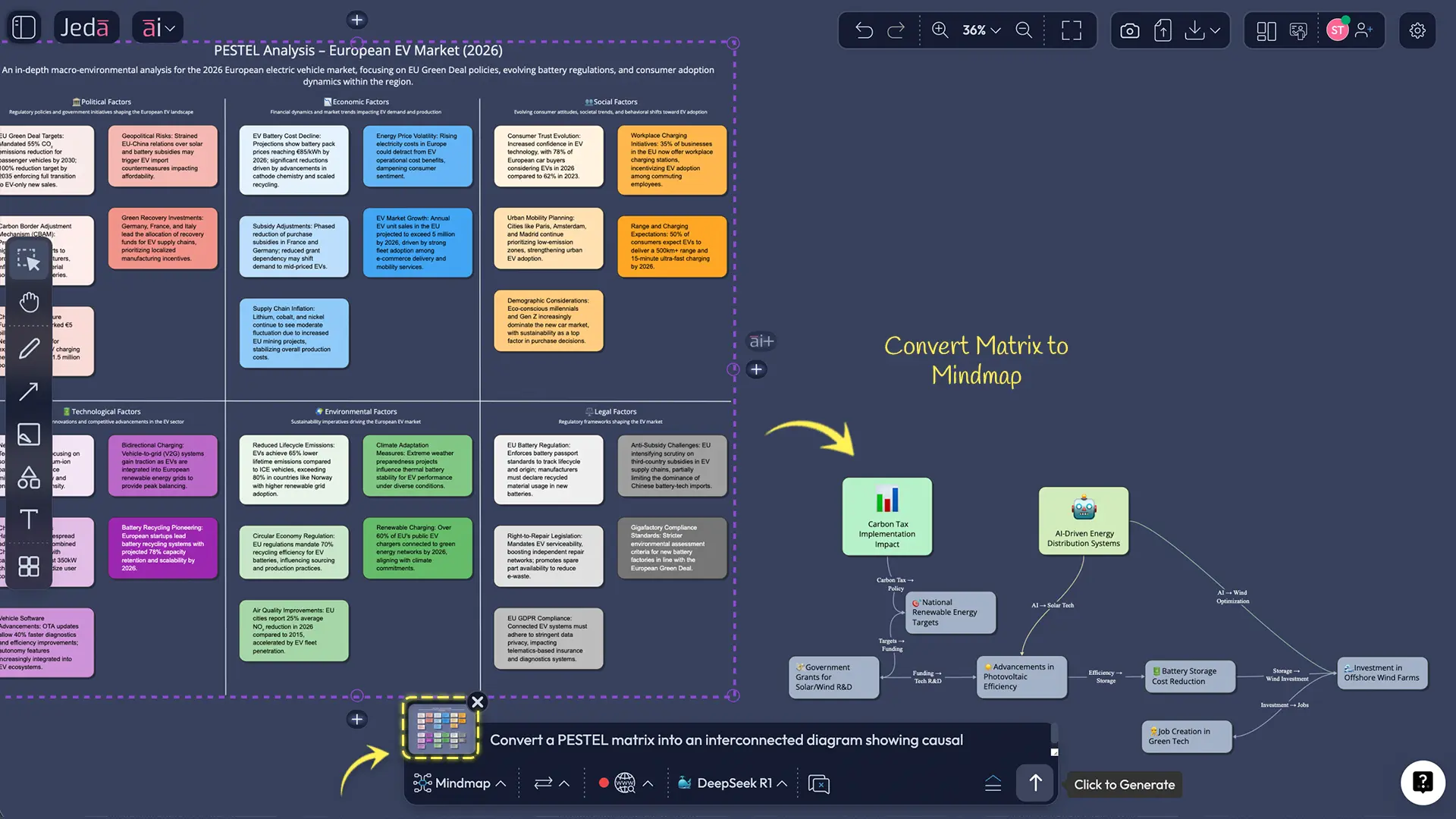
Use Vision Transform to turn your matrix into a diagram, mind map, or flowchart for action planning and stakeholder communication.
- Built for collaboration
Keep strategy discussions in one AI Whiteboard so your team can review, comment, edit, and present from the same source of truth.
Look, the old PESTEL problem is not that the framework is weak. It isn’t. The problem is that teams often stop at categorizing trends and never connect them to strategic choices. AI helps you get to the implications faster: where to invest, where to hold, where regulation is likely to bite, and where timing matters more than conviction.
When should you use PESTEL Analysis?
PESTEL works best when the external environment matters more than internal execution details. That includes:
- entering a new country or region
- assessing a new category or adjacent market
- evaluating product-market timing
- reviewing regulatory exposure
- pressure-testing annual or quarterly strategy
- building board materials for uncertain environments
- comparing how macro forces affect multiple scenarios
It is especially useful early in strategic planning. Before SWOT. Before roadmap debates. Before someone says, “Let’s just launch and see.” Famous last words, that one.
How to create PESTEL Analysis in Jeda.ai
Jeda.ai already has a live resource path for this topic and supports a guided recipe flow for PESTEL through the AI Menu, plus a manual Prompt Bar workflow for teams that want more control. The platform’s current workspace model also supports AI+, Vision Transform, collaboration, and exports in PNG, SVG, and PDF.
Method 1: Recipe Matrix
This is the recommended route when you want speed, structure, and fewer chances to freestyle yourself into nonsense.
- Open a board in your AI Workspace
Create or open a workspace in Jeda.ai. This becomes the shared canvas for your external-environment review.
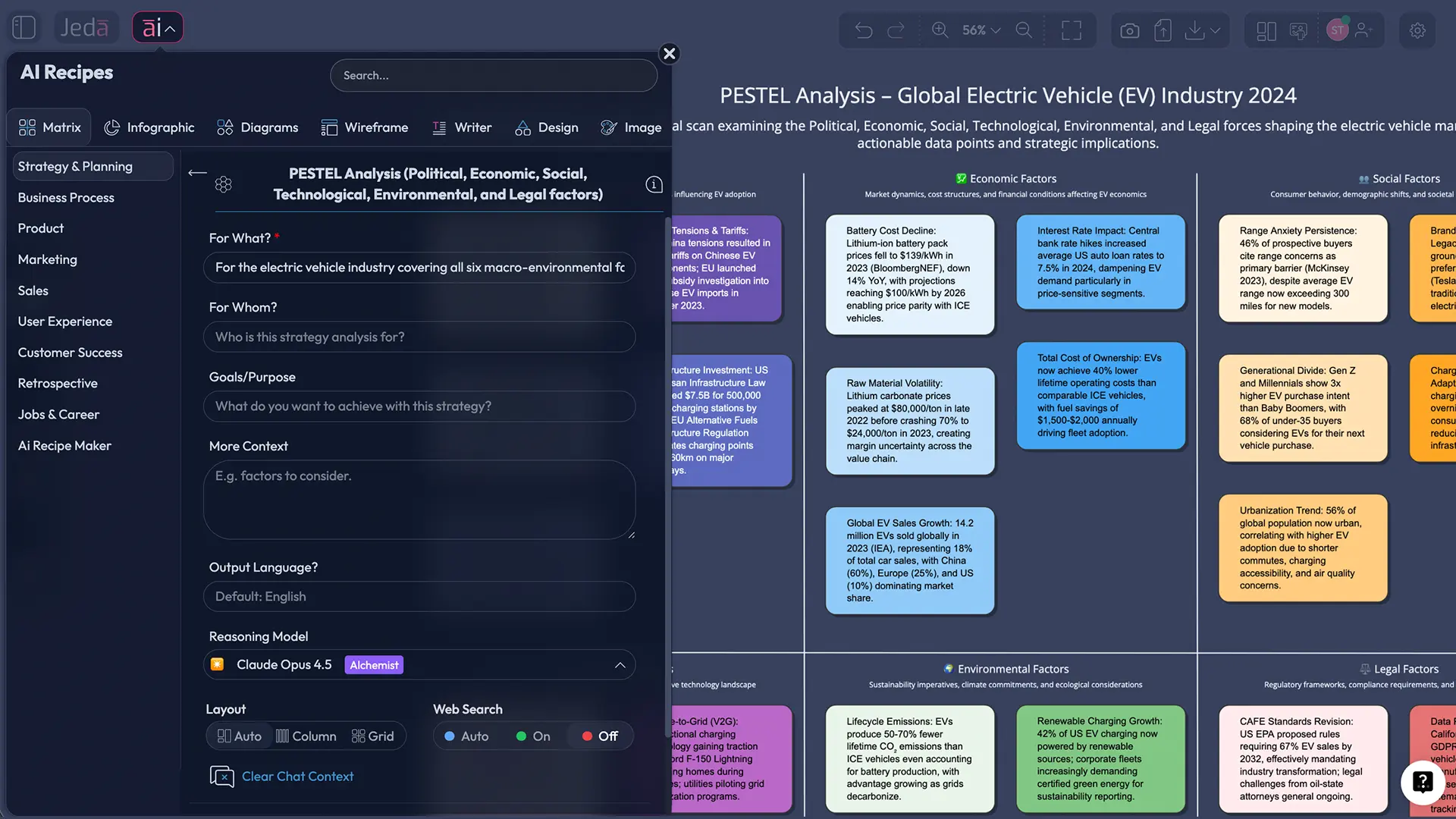
- Open the AI Menu and choose Matrix Recipes
From the top-left AI Menu, go to Matrix Recipes, then navigate to the Strategy & Planning category and open the PESTEL Analysis recipe.
- Add your business context
Enter the company, market, region, goal, and any extra context that changes the analysis such as industry constraints, timing, or expansion plans.
- Generate the framework
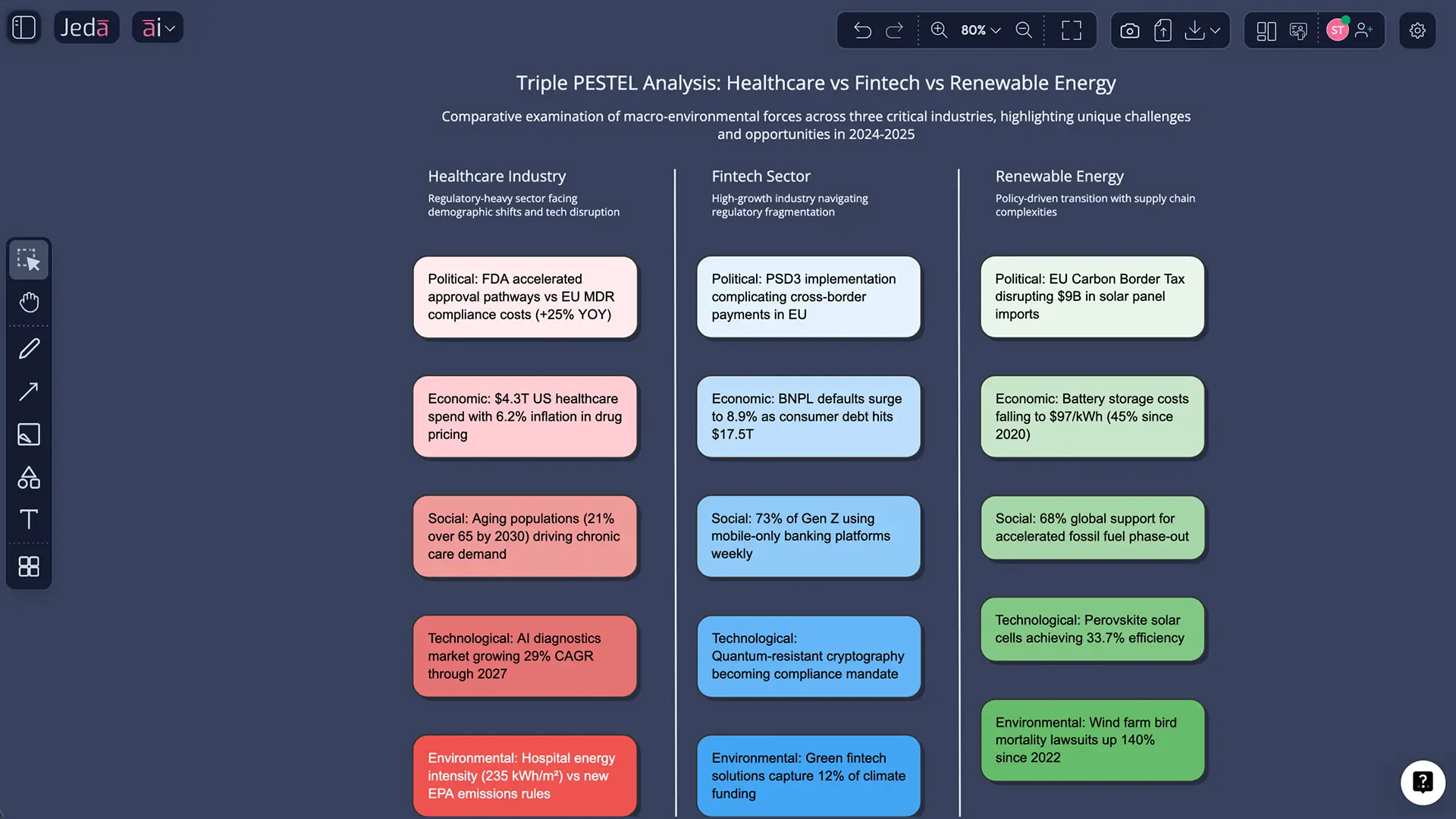
Let Jeda.ai create the initial PESTEL matrix with the six categories mapped into an editable visual.
- Refine and extend with AI+
Select any box that feels thin, generic, or disputed, then use the AI+ button to expand the issue, add detail, or challenge assumptions.
- Transform, collaborate, and export
Use Vision Transform to convert the matrix into a diagram or flowchart if needed, then share, present, or export as PNG, SVG, or PDF.
Method 2: Prompt Bar
This method is better when you want tighter control over scope, depth, geography, or output style.
Copy-paste prompt:
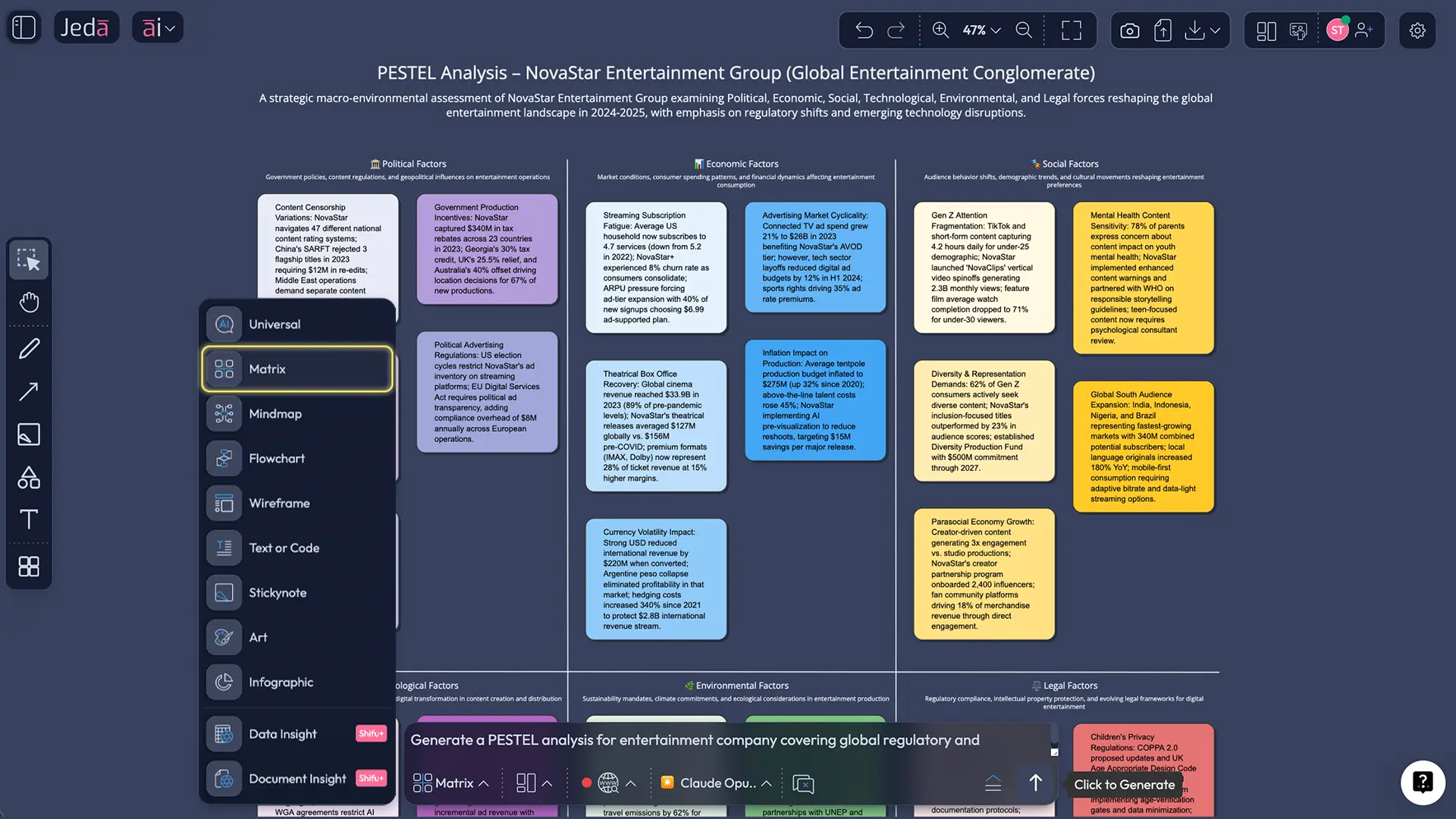
Create a PESTEL Analysis for [company / product / initiative] in [market / region].
Goal: [expansion / launch / risk review / strategic planning / investment decision].
Build a matrix with 6 sections: Political, Economic, Social, Technological, Environmental, Legal.
For each section, include: key external forces, opportunities, threats, and strategic implications.
Make the output specific to the industry, region, and time horizon. Avoid generic filler.
End with the top 5 executive actions and 3 uncertainties to monitor over the next 12 months.
AI+ button generated deep dive
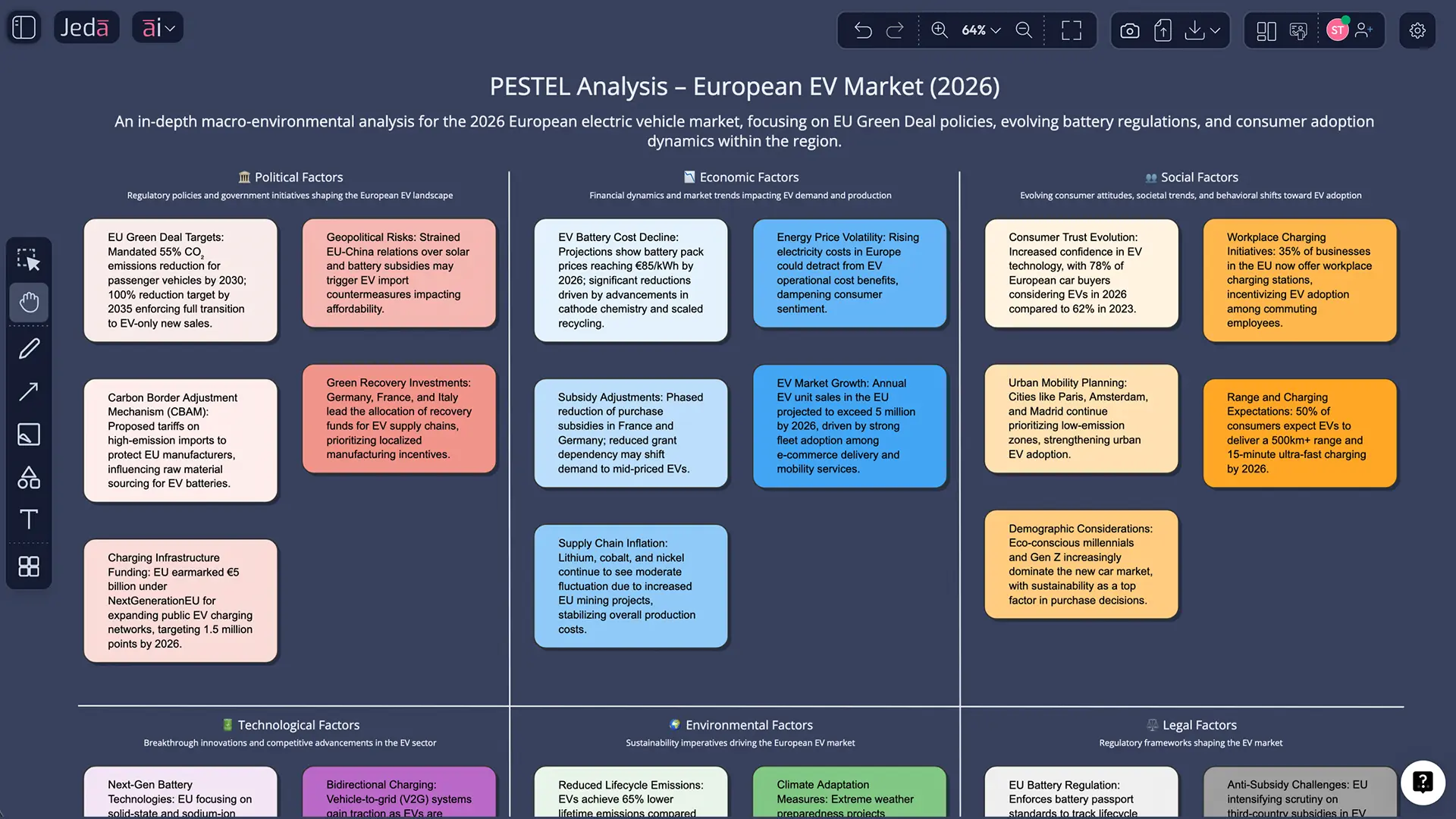
This is where the page gets smarter. After the base matrix is generated, do not stop there. Select one section—say Legal or Technological—and use AI+ to extend it into a deeper threat map, policy-impact breakdown, scenario cluster, or mitigation plan.
You cannot reliably pre-script every useful deep-dive path because the value depends on what the first matrix surfaces. That’s the point of AI+. It reacts to what is already on the board.
A few practical deep-dive directions:
- extend Political into a market-entry risk map
- extend Economic into a pricing-pressure or cost-volatility view
- extend Technological into platform dependency or AI disruption scenarios
- extend Environmental into supply-chain exposure and reporting obligations
- extend Legal into compliance requirements and timeline risks
PESTEL Analysis template walkthrough with examples
Example 1: SaaS company entering a new region
A SaaS company expanding into Southeast Asia might discover that the opportunity is real, but the shape of the risk is uneven.
What tends to matter most
- data residency and privacy law differences
- local cloud infrastructure and procurement friction
- pricing sensitivity under currency pressure
- AI regulation and enterprise trust concerns
- adoption patterns across industries and language groups
What teams often miss
- how quickly legal and political friction can slow enterprise sales cycles
- how social trust and procurement behavior affect expansion far more than product quality does
- how a technically “ready” market may still be commercially awkward
Example 2: Consumer brand facing cost pressure and regulation
A consumer brand may use PESTEL to understand how inflation, environmental compliance, packaging expectations, labor shifts, and platform-driven marketing changes affect margin and brand position at the same time.
What tends to matter most
- inflation and consumer spending pressure
- environmental packaging rules
- retail bargaining power and legal claims risk
- social shifts toward healthier, more sustainable products
- advertising platform changes and data restrictions
Here, PESTEL helps teams avoid one classic mistake: solving a margin problem with a pricing decision that ignores social and legal backlash.
Example 3: Manufacturing or industrial operation under transition pressure
For industrial teams, PESTEL is often less about “nice-to-know” macro trends and more about whether the economics of the operating model still hold.
What tends to matter most
- energy costs and grid reliability
- emissions regulation
- trade policy and tariffs
- labor availability
- automation capability and capex timing
And yes, this is exactly the kind of analysis that gets better when you can attach documents, reports, and spreadsheets to the same board instead of playing strategy ping-pong across five tools.
Best practices for a stronger PESTEL Analysis
Common mistakes to avoid
The biggest mistake is treating PESTEL like a bucket list of external facts. Strategy does not improve because you named six categories.
Other frequent errors:
- staying generic instead of market-specific
- mixing internal issues into an external scan
- writing observations without strategic implications
- failing to rank or prioritize the forces
- doing the analysis once and never revisiting it
- assuming AI’s first draft is the answer rather than the starting point
Honestly, that last one is the sneakiest. Fast output can create false confidence. Good teams still interrogate the board.
| Feature | Jeda.ai | Miro | Static PESTEL Templates | |
|---|---|---|---|---|
| Full 6-factor PESTEL (adds Legal + Environmental to PEST) | — | ✓ | 4-factor PEST template | Varies by template |
| AI-generated first draft from your business context | — | ✓ | Miro Assist (general AI, not PESTEL-specific) | ✗ |
| AI+ deep-dive on a single weak section | — | ✓ | ✗ | ✗ |
| Convert into a decision diagram or flowchart | — | ✓ | ✓ | ✗ |
| Free plan available | — | ✓ | ✓ | ✓ |
Frequently asked questions
- What is the difference between PESTEL and PESTLE?
- There is no practical difference. Both refer to the same six-factor external analysis framework: political, economic, social, technological, environmental, and legal. Different teams simply arrange the last two letters differently.
- What is PESTEL Analysis used for?
- PESTEL analysis is used to scan the external macro-environment around a business, market, or initiative. Teams use it to identify risks, opportunities, and external pressures before making strategic decisions.
- When should a team run a PESTEL Analysis?
- Run it before major strategy moves such as expansion, market entry, product launches, investment decisions, or annual planning. It is most useful when outside forces could materially affect outcomes.
- How does AI improve a PESTEL Analysis?
- AI speeds up the first draft, helps surface external drivers faster, and gives teams a structured starting point. The real gain comes when teams refine the output, prioritize the forces, and extend weak sections with AI+.
- Can Jeda.ai create PESTEL Analysis visually?
- Yes. Jeda.ai can generate PESTEL Analysis as an editable matrix inside its AI Workspace and AI Whiteboard. Teams can use Matrix Recipes, the Prompt Bar, AI+, Vision Transform, collaboration tools, and exports.
- What command should I use in Jeda.ai for PESTEL Analysis?
- Use the Matrix command when creating it manually in the Prompt Bar. If you want the guided path, open the AI Menu and use the Matrix Recipe for PESTEL Analysis under Strategy & Planning.
- Can I extend only one part of the analysis?
- Yes. Select a single section or shape and use the AI+ button to deepen that area without regenerating the full board. This is useful for deeper legal, technological, or environmental follow-up analysis.
- Can I convert the finished PESTEL board into another format?
- Yes. Use Vision Transform to convert the matrix into a different visual such as a diagram or flowchart when you want to present implications, action paths, or scenarios more clearly.
- Can we export the final board?
- Yes. Jeda.ai supports exports such as PNG, SVG, and PDF for sharing, presenting, and archiving your strategic work.
- How often should we revisit a PESTEL Analysis?
- Quarterly is a strong default for most strategy teams. Revisit it sooner when regulation changes, technology shifts fast, or macro conditions are unstable enough to alter the original assumptions.
Sources & further reading
- [1]
Francis J. Aguilar (1967) . “Scanning the Business Environment” Macmillan / Google Books bibliographic record.
View Source ↗ - [2]
Asana (2026) . “How to Do PEST Analysis (PESTLE): A Simple Guide [2026]” Asana.
View Source ↗ - [3]
J. Song, Y. Sun, Y. Jin (2017) . “PESTEL analysis of the development of the waste-to-energy incineration industry in China” Renewable and Sustainable Energy Reviews.
View Source ↗ - [4]
G. C. de Sousa, X. Castañeda-Ayarza (2022) . “PESTEL analysis and the macro-environmental factors that influence the development of the electric and hybrid vehicles industry in Brazil” Case Studies on Transport Policy.
View Source ↗ - [5]
Sage Knowledge (n.d.) . “Analysis of the Macro (FAR) Environment” Sage.
View Source ↗
Related frameworks
- SWOT Analysis with AI
- Porter's Five Forces with AI
- Ansoff Matrix with AI
- Explore the full library: AI Templates
Start Your PESTEL Analysis with AI Today
Join over 150,000+ users who use Jeda.ai’s AI Workspace and AI Whiteboard to turn external signals into decision-ready strategy.
Try Free Template