
AI Sitemap & IA
Audit the existing site → manually map page hierarchy in a spreadsheet → redraw the sitemap in Whimsical or Miro → stakeholder review → revisions → redraw again.
Scattered tools and analysis paralysis at every handoff
Audit the existing site → manually map page hierarchy in a spreadsheet → redraw the sitemap in Whimsical or Miro → stakeholder review → revisions → redraw again.
Whiteboard the flow with sticky notes → photograph it → rebuild in Lucidchart or FigJam → add decision nodes and error states → share via link.
Open Figma → start from an empty artboard or hunt for a template → place boxes, text blocks, navigation → iterate layout options with the team.
Export usability test results to Excel → manually calculate task completion rates → build charts in Google Sheets → copy into a findings deck.
Read through 40 pages of user interview transcripts → manually tag themes → build an affinity diagram on Miro → summarize into a PowerPoint deck.
Crawl the existing site → catalog pages in a spreadsheet → assess content quality manually → build a content matrix showing gaps and overlaps.
Share wireframes via Figma link → collect feedback in comment threads → receive conflicting opinions across Slack, email, and meeting notes.
Precise UX decisions in minutes — visual intelligence from Multi-LLM AI
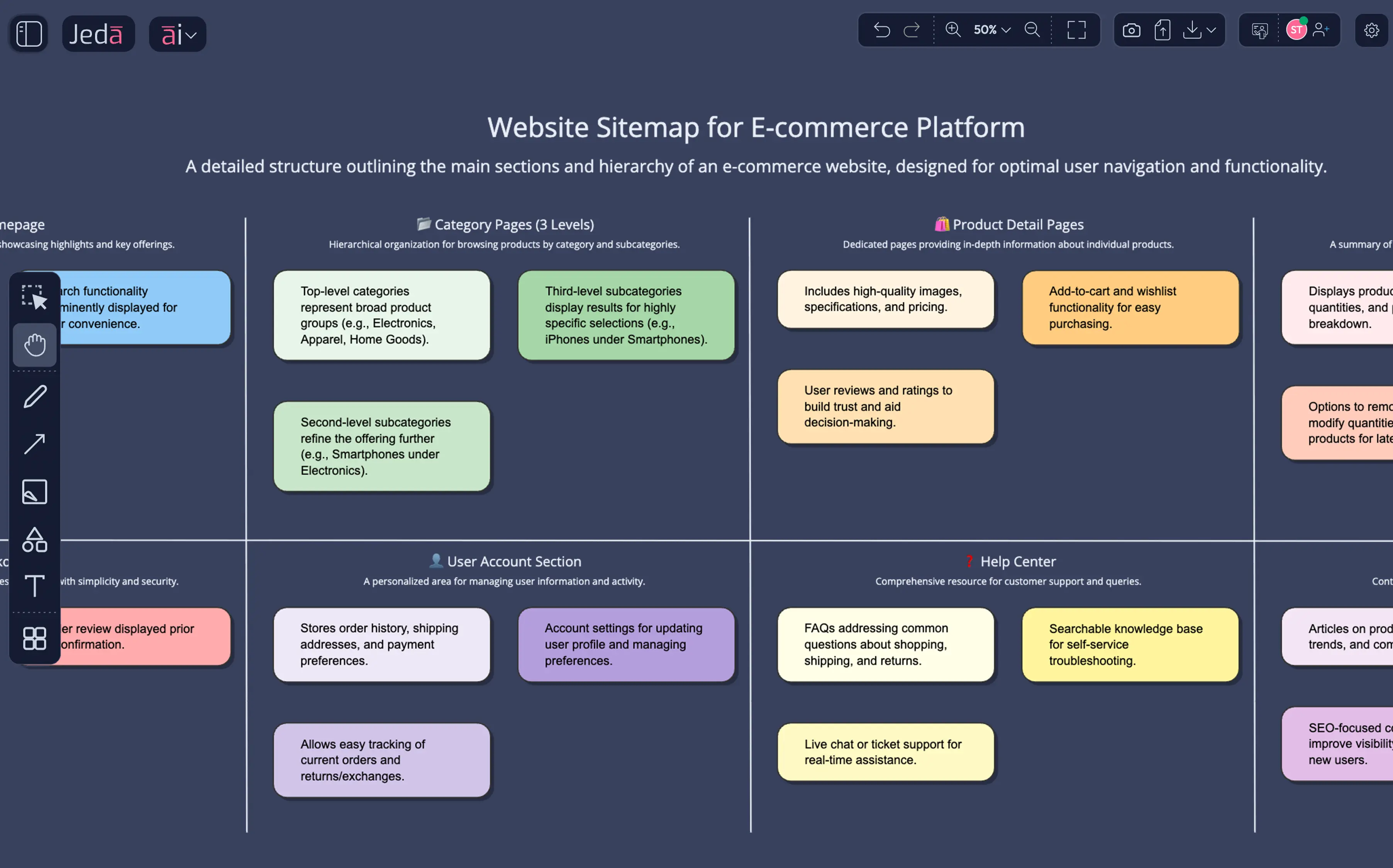
Encoding decades of IA methodology, the AI builds the full hierarchy on your canvas. Visual output your team processes 20× faster than sitemap spreadsheets.
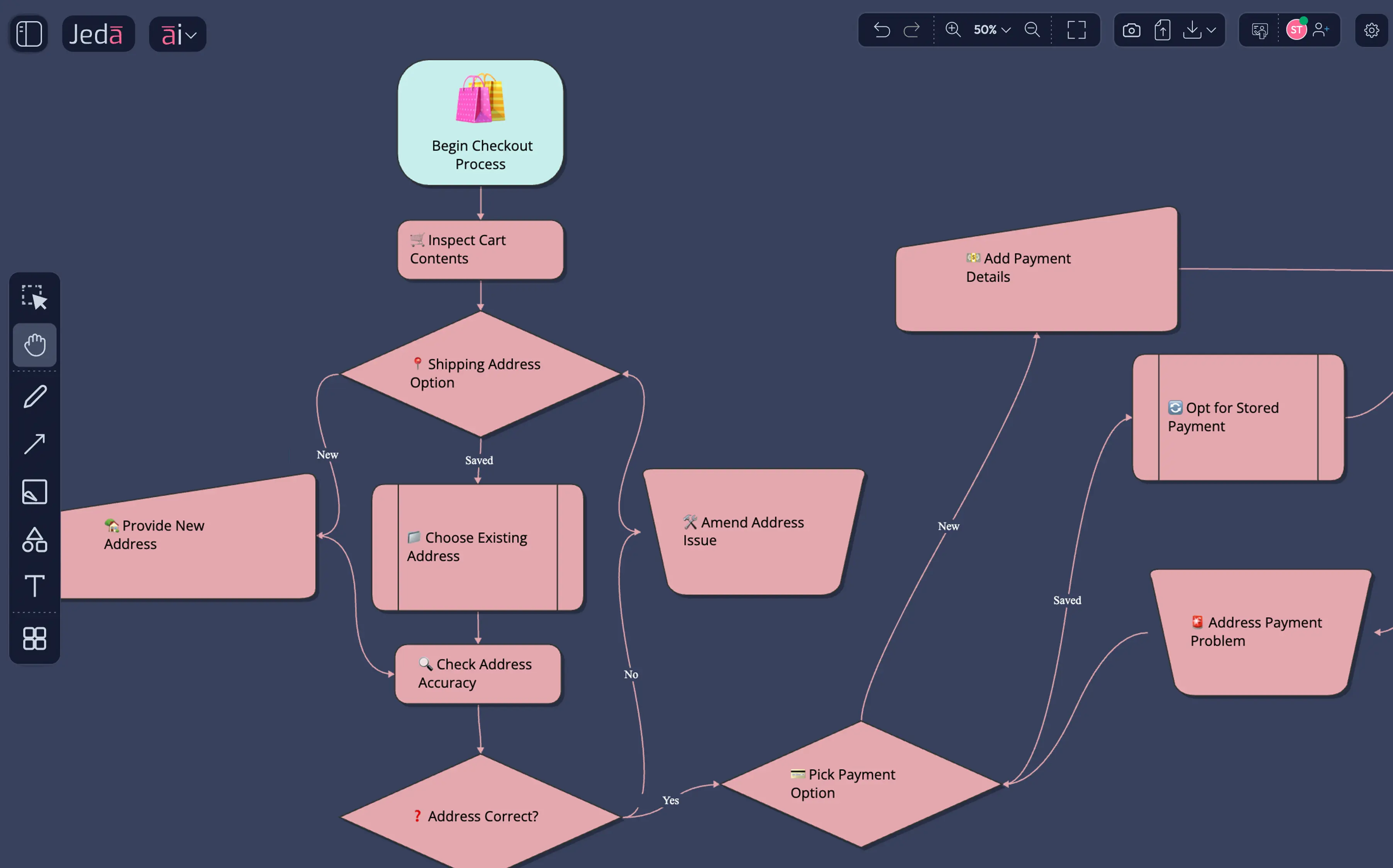
A user flow diagram shows the full experience at once. AI generates the flow with decision diamonds; your team validates and refines user assumptions together.
Framework built over decades of UI practice, now AI-populated. Compare 6 variations side-by-side to iterate on layout ideas visually, not pixel placement.
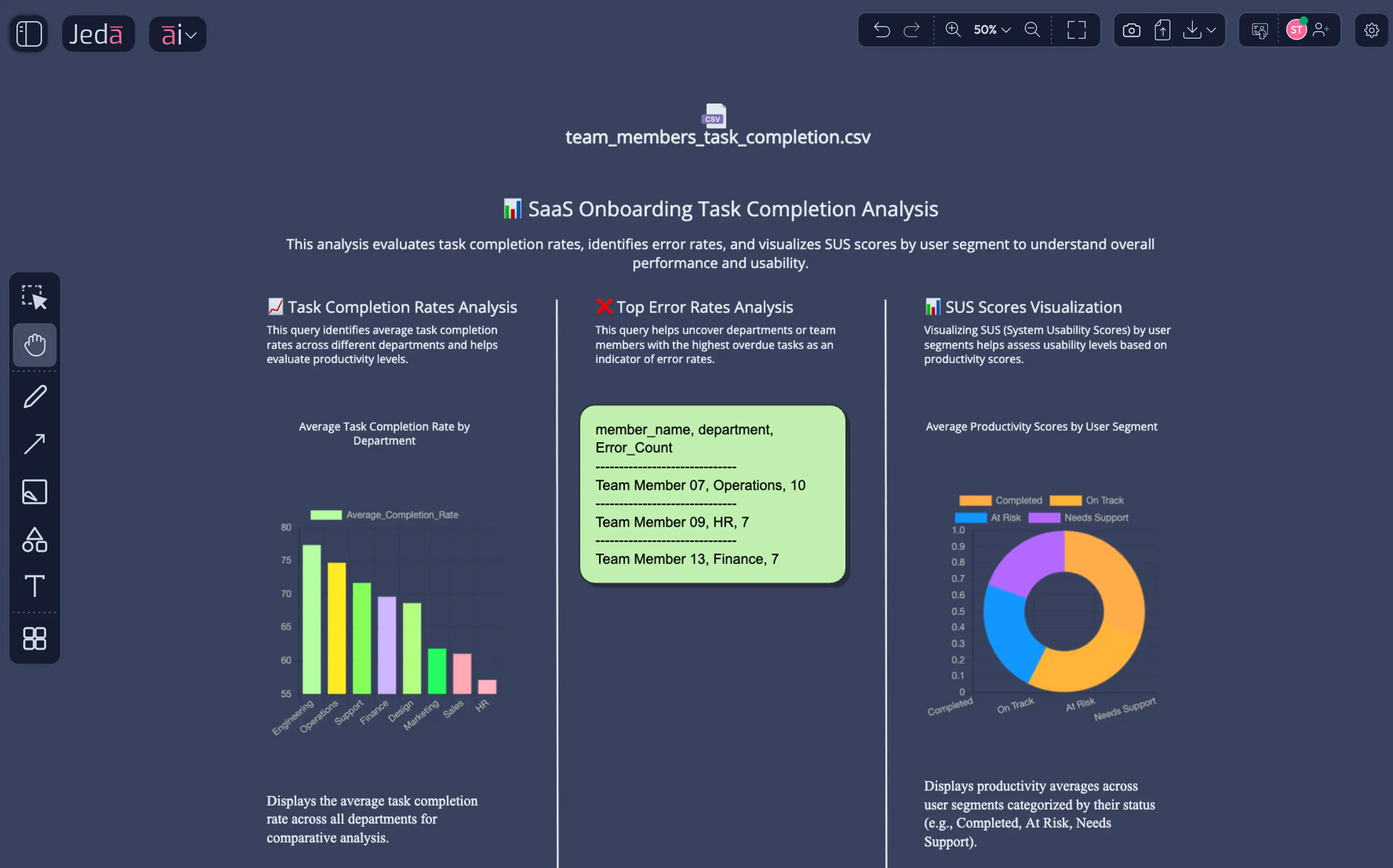
Your team validates usability data visually before presenting. AI identifies issues; your designers decide which severity rankings reflect the real user pain.
Research synthesis built on proven UX methodology. AI extracts behavioral patterns from transcripts for visual review — 20× faster than reading reports.
A content matrix shows gaps at a glance. AI populates the audit; your content strategy team challenges the quality assessments on a shared canvas.
AI thinks WITH you by critiquing for accessibility gaps. Your team sees the feedback visually in context and makes the final design call together.
Encoding decades of IA methodology, generate multi-level website sitemaps and content hierarchy visuals. A sitemap shows the full structure at once, which your team validates on a shared visual canvas.
A user flow diagram shows the full experience at once — 20× faster than sequential screen descriptions. Describe onboarding or checkout and AI generates the complete flow with branching logic for team review.
Generate 6 wireframe variations in seconds, encoding UI best practices refined over decades. Your team validates the information architecture and layout concepts before high-fidelity design begins.
Upload usability CSVs and watch Jeda.ai transform metrics into visual usability charts. Your team comprehends the full research picture simultaneously, enabling parallel comprehension and faster decisions.
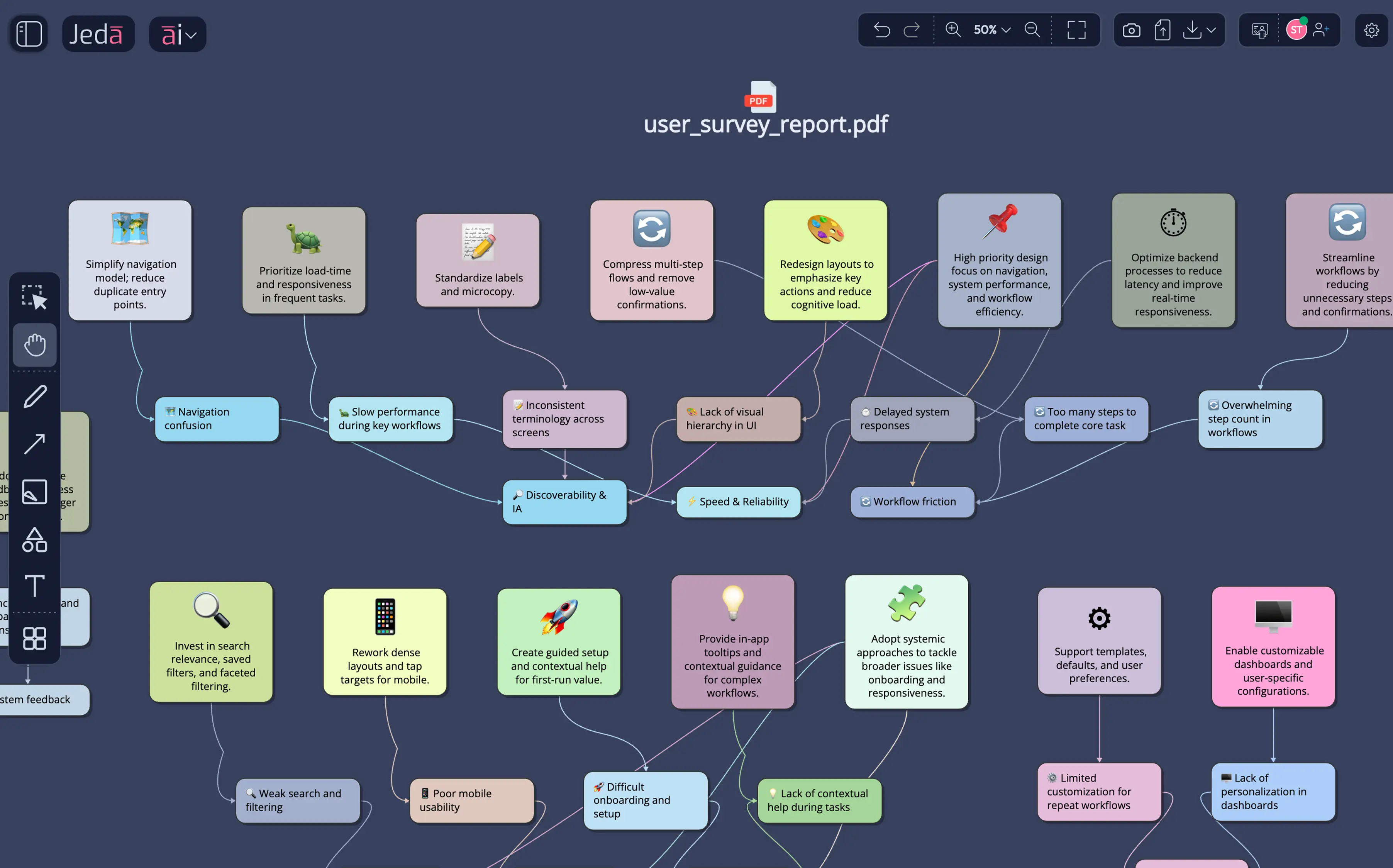
Extract user pain points from interview transcripts and research reports. AI populates structured insight frameworks based on proven UX methodology, while your team validates the behavioral patterns together.
A full AI powerhouse — the most powerful language, reasoning, and image models packed together for every use case. Jeda.ai's Multi-LLM Agent runs multiple models simultaneously, picks the best output, and delivers smarter results than any single model alone.
Drag your usability test CSV, research report PDF, or analytics export onto the AI Workspace canvas. Data Insight turns your task completion data and survey results into visual usability charts. Document Insight extracts themes and pain points from research transcripts.
Visual usability analysis
Research synthesis
Pick the command that matches your deliverable. Sitemap or ecosystem map? AI Diagram. User flow or onboarding funnel? AI Flowchart. Dashboard layout or mobile screen? AI Wireframe. Multiple models compare reasoning so AI thinks WITH you — presenting the best analysis, not dictating one answer.
Parallel reasoning
UX recipe library
Not a blank template. A visual framework built on decades of UX methodology — populated with AI analysis your team reviews visually. Type your UX question and the AI generates a structured sitemap on your canvas with proper hierarchy.
Continuous iteration
Current design patterns
AI generated the framework. Your team sees it, challenges it, and decides together. That's thinking WITH, not FOR. Invite stakeholders to annotate directly and use AI to evaluate for usability gaps or accessibility issues.
Live team cursors
Usability & accessibility
Export sitemaps, user flows, and wireframes as PNG, SVG, or PDF. Visual deliverables your stakeholders process 20× faster than reading a text report. Your UX deliverables go from the AI Whiteboard to Figma in seconds.
Handoff-ready files
Live UX documentation
AI should think WITH you, not generating FOR you. That means comparing multiple perspectives — not trusting one model's output. Jeda.ai aggregates reasoning from GPT-5.4, Claude Opus 4.5, and more for superior UX logic.
Jeda.ai pulls the latest UX patterns, accessibility standards, and industry benchmarks into your deliverables. Your AI-generated sitemaps and wireframes are based on what works today, not last year's training data.
UX methodology refined over decades deserves unlimited iteration. Your team generates dozens of variations per sprint — no credit walls or interruptions to the creative process.
Turn your whiteboard sketches and low-fidelity prototypes into structured digital deliverables instantly. AI understands your visual intent and formalizes the hierarchy.
AI populates the IA; your team validates the hierarchy and navigation paths based on research findings. Built on IA methodology developed over decades.
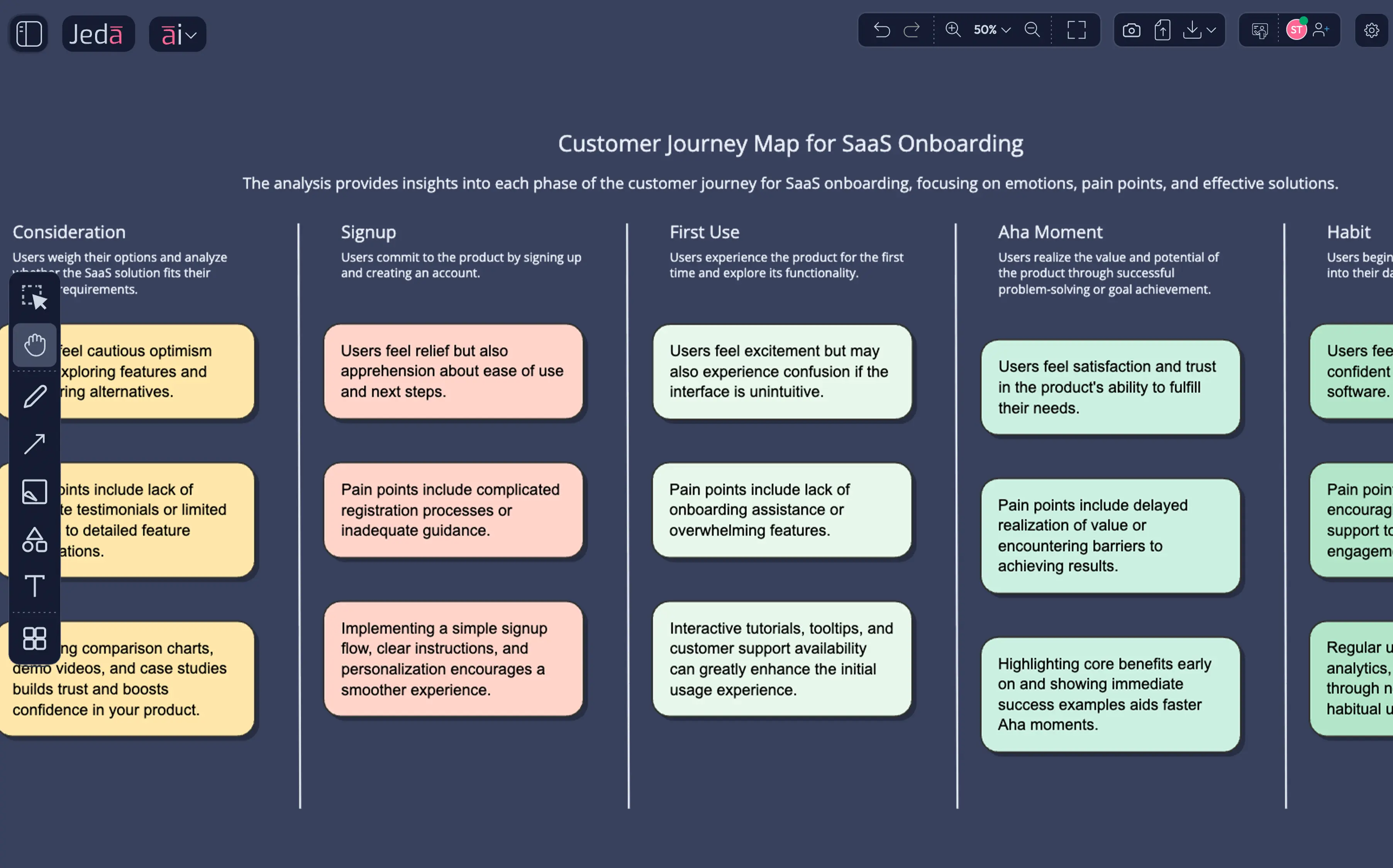
A journey map shows the full experience at once. Your team validates assumptions before high-fidelity design. Visual format your stakeholders process 20× faster.
Generate concepts instantly, encoding UI best practices. Your team validates and refines the interface sketches together. Move to Figma with a validated plan.
Synthesize interview transcripts and usability data into visual findings that product teams actually act on. Your brain processes the visual output 20× faster than text.
Map content hierarchies and audit existing site structures. AI populates the framework; your team validates the logic together.
Visualize customer journey maps and service blueprints. Your team sees the full experience simultaneously, identifying friction points before high-fidelity.
Build deep information architecture with parent-child relationships and content labeling automatically.
Generate complex flows with decision logic, error states, and labeled interaction paths.
Convert text descriptions into structured UI layouts for dashboards, mobile apps, and websites.
Turn raw research data into visual findings, metric comparisons, and severity-ranked issue lists.
AI thinks WITH you by comparing results from GPT-5.4, Claude Opus 4.5, and Grok 4 Fast to ensure your UX logic is sound.
Team validates and refines frameworks together on one collaborative canvas with live cursors.
Visual output your team processes 20× faster — available as PNG, SVG, and PDF.
UX methodology refined over hundreds of years deserve unlimited iteration — no credit walls.
| Feature | Jeda.aiAI-First | ChatGPT | Figma / FigJam | Miro | Whimsical | Balsamiq |
|---|---|---|---|---|---|---|
| AI UX Deliverables | Prompt → wireframes, flows, maps | Limited | Limited | Limited | Limited | |
| Dynamic Prompt | AI thinks WITH you | |||||
| Multi-LLM Agent | 18 AI Models + Aggregator | |||||
| Unlimited AI Content | Unlimited | Limited | Limited | Limited | Limited | |
| Document to Visuals | Research → journey maps | Limited | ||||
| Data Insight | Usability data → SUS dashboards | Limited | ||||
| Vision Transform | Flow → wireframe → sitemap | |||||
| AI-Powered Design Review | Multi-user Canvas + AI Chat | Limited | Limited | Limited | ||
| Web Search | Live WCAG & design patterns | Limited | ||||
| Pricing | Free / $10/user/mo | $20/mo | Free / $15/user/mo | Free / $10/user/mo + Limited AI Credit | Free / $10/user/mo | $12/mo |
Comparison based on publicly available information as of March 2026.
Reduce the time spent on sitemaps, user flows, and wireframes from days to minutes with AI generation.
Iterate on layouts and flows in real-time during review meetings to reach consensus faster.
Turn research reports into visual frameworks that the whole product team actually understands and uses.
Explore more design directions per sprint with unlimited AI tokens and Multi-LLM intelligence.
"Jeda.ai Version 3 sounds like a game-changer! The ability to turn ideas into editable visuals instantly and the multi-LLM agent feature are especially impressive. It’s like an all-in-one workspace for visual thinkers. Definitely excited to try it out!"
"Jeda.ai Version 3 sounds like a game-changer! The ability to turn ideas into editable visuals instantly and the multi-LLM agent feature are especially impressive. It’s like an all-in-one workspace for visual thinkers. Definitely excited to try it out!"
"Jeda.ai Version 3 sounds like a game-changer! The ability to turn ideas into editable visuals instantly and the multi-LLM agent feature are especially impressive. It’s like an all-in-one workspace for visual thinkers. Definitely excited to try it out!"